


Windows Calculator
 | This article needs additional citations for verification. (December 2008) |
 | |
 Calculator in Windows 11 | |
| Original author(s) | Chris Peters, Mark Cliggett, Marc Taylor, Kraig Brockschmidt[1] |
|---|---|
| Developer(s) | Microsoft |
| Initial release | November 20, 1985 |
| Repository | github |
| Written in | C++, C# |
| Operating system | All versions of Microsoft Windows, Xbox system software,[citation needed] Windows 10 Mobile, Windows Phone, Linux[2] |
| Platform | IA-32, x86-64, ARMv7-A, and ARMv8-A (and historically DEC Alpha, Itanium, MIPS, and PowerPC) |
| Type | Software calculator |
| License | Proprietary Software (Windows 1.0 - Windows 8.1) MIT License (Windows 10) |
| Website | aka |
Windows Calculator is a software calculator developed by Microsoft and included in Windows. In its Windows 10 incarnation it has four modes: standard, scientific, programmer, and a graphing mode. The standard mode includes a number pad and buttons for performing arithmetic operations. The scientific mode takes this a step further and adds exponents and trigonometric function, and programmer mode allows the user to perform operations related to computer programming. In 2020, a graphing mode was added to the Calculator, allowing users to graph equations on a coordinate plane.[3]
The Windows Calculator is one of a few applications that have been bundled in all versions of Windows, starting with Windows 1.0. Since then, the calculator has been upgraded with various capabilities.
In addition, the calculator has also been included with Windows Phone[4] and Xbox One.[citation needed] The Microsoft Store page proclaims HoloLens support as of February 2024, but the Calculator app is not installed on HoloLens by default.
History[edit]
A simple arithmetic calculator was first included with Windows 1.0.[5]
In Windows 3.0, a scientific mode was added, which included exponents and roots, logarithms, factorial-based functions, trigonometry (supports radian, degree and gradians angles), base conversions (2, 8, 10, 16), logic operations, statistical functions such as single variable statistics and linear regression.
Windows 9x and Windows NT 4.0[edit]
Until Windows 95, it uses an IEEE 754-1985 double-precision floating-point, and the highest representable number by the calculator is 21024, which is slightly above 10308 (~1.80 × 10308).
In Windows 98 and later, it uses an arbitrary-precision arithmetic library, replacing the standard IEEE floating point library.[6] It offers bignum precision for basic operations (addition, subtraction, multiplication, division) and 32 digits of precision for advanced operations (square root, transcendental functions). The largest value that can be represented on the Windows Calculator is currently <1010,000 and the smallest is 10−9,999. (Also ! calculates the gamma function which is defined over all real numbers, only excluding the negative integers).
Windows 2000, XP and Vista[edit]
In Windows 2000, digit grouping is added. Degree and base settings are added to menu bar.
The calculators of Windows XP and Vista were able to calculate using numbers beyond 1010000, but calculating with these numbers (e.g. 10^2^2^2^2^2^2^2...) does increasingly slow down the calculator and make it unresponsive until the calculation has been completed.
These are the last versions of Windows Calculator, where calculating with binary/decimal/hexadecimal/octal numbers is included into scientific mode. In Windows 7, they were moved to programmer mode, which is a new separate mode that co-exists with scientific mode.
Windows 7[edit]
In Windows 7, separate programmer, statistics, unit conversion, date calculation, and worksheets modes were added. Tooltips were removed. Furthermore, Calculator's interface was revamped for the first time since its introduction. The base conversion functions were moved to the programmer mode and statistics functions were moved to the statistics mode. Switching between modes does not preserve the current number, clearing it to 0.
The highest number is now limited to 1010000 again.
In every mode except programmer mode, one can see the history of calculations. The app was redesigned to accommodate multi-touch. Standard mode behaves as a simple checkbook calculator; entering the sequence 6 * 4 + 12 / 4 - 4 * 5 gives the answer 25. In scientific mode, order of operations is followed while doing calculations (multiplication and division are done before addition and subtraction), which means 6 * 4 + 12 / 4 - 4 * 5 = 7.
In programmer mode, inputting a number in decimal has a lower and upper limit, depending on the data type, and must always be an integer. Data type of number in decimal mode is signed n-bit[7] integer when converting from number in hexadecimal, octal, or binary mode.
| Data type | Data type size | Lower limit | Upper limit |
|---|---|---|---|
| Byte | 8 bit | −128 | 127 |
| Word | 16 bit | −32,768 | 32,767 |
| Dword | 32 bit | −2,147,483,648 | 2,147,483,647 |
| Qword | 64 bit | −9,223,372,036,854,775,808 | 9,223,372,036,854,775,807 |
On the right of the main Calculator, one can add a panel with date calculation, unit conversion and worksheets. Worksheets allow one to calculate a result of a chosen field based on the values of other fields. Pre-defined templates include calculating a car's fuel economy (mpg and L/100 km),[8] a vehicle lease, and a mortgage. In pre-beta versions of Windows 7, Calculator also provided a Wages template.
Windows 8.1[edit]
While the traditional Calculator is still included with Windows 8.1, a Metro-style Calculator is also present, featuring a full-screen interface as well as normal, scientific, and conversion modes.[9]
Windows 10[edit]
The Calculator in non-LTSC editions of Windows 10 is a Universal Windows Platform app. In contrast, Windows 10 LTSC (which does not include universal Windows apps) includes the traditional calculator, but which is now named win32calc.exe. Both calculators provide the features of the traditional calculator included with Windows 7 and Windows 8.x, such as unit conversions for volume, length, weight, temperature, energy, area, speed, time, power, data, pressure and angle, and the history list which the user can clear.
Both the universal Windows app and LTSC's win32calc.exe register themselves with the system as handlers of a 'calculator:' pseudo-protocol. This registration is similar to that performed by any other well-behaved application when it registers itself as a handler for a filetype (e.g. .jpg) or protocol (e.g. http:).
All Windows 10 editions (both LTSC and non-LTSC) continue to have a calc.exe, which however is just a stub that launches (via ShellExecute) the handler that is associated with the 'calculator:' pseudo-protocol. As with any other protocol or filetype, when there are multiple handlers to choose from, users are free to choose which handler they prefer— either via the classic control panel ('Default programs' settings) or the immersive UI settings ('Default Apps' settings) or from the command prompt via OpenWith calculator:.
In the Windows 10 Fall Creators Update, a currency converter mode was added to Calculator.[10]
On 6 March 2019, Microsoft released the source code for Calculator on GitHub under the MIT License.[11]
Windows 11[edit]
In Windows 11, the Calculator app's user interface was modified to match the design of Windows 11 and a new settings page is present for users to toggle between the themes of the app without changing the operating system's theme. In 2021, Microsoft announced it would migrate the codebase of the Calculator app to C# in order to welcome more developers to contribute to the app.
Gallery[edit]
-
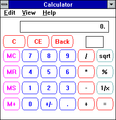 Microsoft Windows NT Calculator Version 3.1
 -
 Windows XP Calculator
 -
 Windows 7 Calculator with Windows Aero
 -
 Windows 8 Calculator
 -
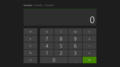 Windows 8.1's additional Metro-style calculator in standard mode
 -
 Windows 10 Modern UI Calculator


Features[edit]
By default, Calculator runs in standard mode, which resembles a four-function calculator. More advanced functions are available in scientific mode, including logarithms, numerical base conversions, some logical operators, operator precedence, radian, degree and gradians support as well as simple single-variable statistical functions. It does not provide support for user-defined functions, complex numbers, storage variables for intermediate results (other than the classic accumulator memory of pocket calculators), automated polar-cartesian coordinates conversion, or support for two-variables statistics.
Calculator supports keyboard shortcuts; all Calculator features have an associated keyboard shortcut.[12]
Calculator in programmer mode cannot accept or display a number larger than a signed QWORD (16 hexadecimal digits/64 bits). The largest number it can handle is therefore 0x7FFFFFFFFFFFFFFF (decimal 9,223,372,036,854,775,807). Any calculations in programmer mode which exceed this limit will overflow, even if those calculations would succeed in other modes. In particular, scientific notation is not available in this mode.
Issues[edit]
![[icon]](/wiki/File:Wiki_letter_w_cropped.svg) | This section needs expansion. You can help by adding to it. (May 2020) |
- In older versions of the calculator, some transcendental function operations, such as square root operator (
sqrt(4) − 2 = −8.1648465955514287168521180122928e−39), caused the number to be calculated incorrectly due to catastrophic cancelation.[13] - Older versions of the universal Calculator in non-LTSC editions of Windows 10 doesn't use any regional format (can be set in Region Control Panel) that are different from the app's display language for number formatting (the app's language is English (United States) but Windows's regional format is set to a different format).[14]
Calculator Plus[edit]
Calculator Plus is a separate application for Windows XP and Windows Server 2003 users that adds a 'Conversion' mode over the Windows XP version of the Calculator. The 'Conversion' mode supports unit conversion and currency conversion. Currency exchange rates can be updated using the built-in update feature, which downloads exchange rates from the European Central Bank.[15][16]
See also[edit]

References[edit]
- ^ "Kraig Brockschmidt, Creator of Calc, on the Early Days at Microsoft | Seth Juarez | Channel 9". Archived from the original on 2020-09-23. Retrieved 2020-05-23.
- ^ Fagioli, Brian (15 October 2020). "How to install Microsoft Windows Calculator on Linux". betanews. Retrieved 2020-10-16.
- ^ "Windows Calculator will get a Graphing Mode: first look - gHacks Tech News". gHacks Technology News. 2020-01-17. Retrieved 2022-09-02.
- ^ "Von Windows Phone 8.1 zu Windows 10 Mobile: Eine kleine Revolution in Screenshots" (in German). Dr.Windows. 27 October 2015. Retrieved 27 January 2024.
- ^ Windows 1.01 - Graphical User Interface Gallery
- ^ "The Old New Thing Blog: When you change the insides, nobody notices". Archived from the original on 2010-03-06. Retrieved 2007-05-28.
- ^ Where n is either: 8 for Byte, 16 for Word, 32 for Dword, or 64 for Qword.
- ^ Calculate Fuel Economy - Windows 7 (MalekTips)
- ^ "Hands-On with Windows 8.1: New Utility Apps". Paul Thurrott's Supersite for Windows. Retrieved September 24, 2013.
- ^ - Windows 10 Tip: Travel easier with the built-in currency converter
- ^ Foley, Mary Jo (6 March 2019). "Microsoft is open-sourcing Windows Calculator on GitHub". ZDNet. Retrieved 6 March 2019.
- ^ "Keyboard shortcuts". Windows 8 Help. Microsoft. Retrieved 11 March 2013.
- ^ "Microsoft Fixes Decade-Old Windows Calculator Square Root Bug". news.softpedia.com. Retrieved 2023-04-15.
- ^ "Wrong usage of Regional settings in Windows 10 Apps: weather, calculator". answers.microsoft.com. Retrieved 2021-01-24.
- ^ "Microsoft Calculator Plus". Tek.no (in Norwegian). 13 September 2004.
- ^ "Use this great maths tool for cheats! - 9Finance". finance.nine.com.au.
External links[edit]

| |||||||
| Management tools |
| ||||||
| Apps |
| ||||||
| Shell | |||||||
| Services | |||||||
| File systems | |||||||
| Server |
| ||||||
| Architecture |
| ||||||
| Security | |||||||
| Compatibility | |||||||
| API | |||||||
| Games | |||||||
| Discontinued |
| ||||||
| Spun off to Microsoft Store | |||||||
