


Amazon Kindle
 | |
| Developer | Amazon |
|---|---|
| Manufacturer | Foxconn |
| Product family | Kindle |
| Type | E-reader |
| Release date | November 19, 2007 |
| Introductory price | US$399; equivalent to $586 in 2023 (Kindle 1) |
| Operating system | Kindle firmware, utilizing Linux kernel[1] Latest versions[2]
|
| CPU | Low-power ARM SoC Marvell Xscale 1st gen Freescale i.MX 2nd-10th gen MediaTek MT81xx 11th gen |
| Memory | 32 MB - 512 MB RAM |
| Storage | Flash memory Internal 256 MB - 64 GB External SD card 1st gen |
| Display |
|
| Sound | Speakers/3.5 mm headphone jack (Kindle 1, 2, DX, Keyboard, Touch) USB Audio Adapter (Kindle Voyage, Paperwhite 3) Bluetooth (8th gen and newer)[4] |
| Input | USB Mini-B 1st gen USB Micro-B 2nd gen-10th gen USB-C 11th gen and newer |
| Controller input | Keyboard, scrollwheel, D-pad select models, 2007–2012 Touchscreen select models 2011–2012, all models 2013-present Stylus Pen Kindle Scribe |
| Camera | None |
| Connectivity | Amazon Whispernet 3G models 802.11 Wi-Fi 3rd gen and newer Bluetooth 8th gen and newer - Sound only |
| Online services | Kindle Store |
| Dimensions | List
|
| Mass | List
|
| Website | amazon |
| Amazon Kindle models[5] |
|---|
|
| E Ink devices |
|
Amazon Kindle is a series of e-readers designed and marketed by Amazon. Amazon Kindle devices enable users to browse, buy, download, and read e-books, newspapers, magazines and other digital media via wireless networking to the Kindle Store.[6] The hardware platform, which Amazon subsidiary Lab126 developed, began as a single device in 2007. Currently, it comprises a range of devices, including e-readers with E Ink electronic paper displays and Kindle applications on all major computing platforms. All Kindle devices integrate with Windows and macOS file systems and Kindle Store content and, as of March 2018, the store had over six million e-books available in the United States.[7]
Naming and evolution[edit]
In 2004, Amazon founder and CEO Jeff Bezos instructed the company's employees to build the world's best electronic reader before Amazon's competitors could. Amazon originally used the codename Fiona for the device.[8]
Branding consultants Michael Cronan and Karin Hibma devised the Kindle name. Lab126 asked them to name the product, and they suggested "kindle", meaning to light a fire.[9] They felt this was an apt metaphor for reading and intellectual excitement.[10]
Kindle hardware evolved from the original Kindle introduced in 2007 and the Kindle DX (with its larger 9.7" screen) introduced in 2009. The DX remained the only non-6" eink Kindle device until the 2017 introduction of the Oasis 2. The range included early generation devices with a keyboard (Kindle Keyboard), devices with touch-sensitive, lighted, high-resolution screens (Kindle Paperwhite), early generations of a tablet computer with the Kindle app (Kindle Fire), and low-priced devices with a touch-sensitive screen (Kindle 7). However, the Kindle e-reader has often been a narrow-purpose device for reading rather than being multipurpose hardware that might create distractions while reading. Active Content support was introduced in 2010 only to be dropped from new Kindle devices in late 2014. After the first three generations, the Kindle Fire tablet branding was changed to Amazon Fire in 2014; this name change reflected their wider capabilities as an Android-derived tablet. Other later developments include devices with larger eink displays such as the Kindle Oasis 2 (2017) at 7" and the Paperwhite 5 (2021) at 6.8", as well as a device with a 10.2" screen and Wacom stylus support called the Kindle Scribe (2022). In 2022 Amazon also introduced the 11th gen Kindle with a 300 PPI display, ending the use of the 6" 167 PPI display that had been on every basic Kindle since 2007.
Amazon has also introduced Kindle apps for use on various devices and platforms, including Windows, macOS, Android, iOS, BlackBerry 10 and Windows Phone.[11] Amazon also has a cloud reader to allow users to read e-books using modern web browsers.[12]
Devices[edit]
Kindles with physical keyboards[edit]
-
 The first Kindle
 -
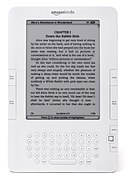 Kindle 2
 -
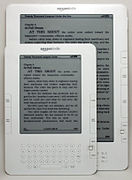 A Kindle DX underneath a Kindle 2
 -
 Kindle DX Graphite
 -
 Kindle Keyboard


First generation[edit]
Kindle[edit]
Amazon released the Kindle, its first e-reader, on November 19, 2007, for $399.[13] It sold out in 5.5 hours.[14] The device remained out of stock for five months until late April 2008.[15]
The device featured a six-inch (diagonal) four-level grayscale E Ink display, with 250 MB of internal storage, which can hold approximately 200 non-illustrated titles.[16] It also has a speaker and a headphone jack for listening to audio files.[13] It has expandable storage via an SD card slot. Content was available from Amazon via the Sprint Corporation US-wide EVDO 3G data network, via a dedicated connection protocol which Amazon called Whispernet.[16] Amazon did not sell the first-generation Kindle outside of the US.[16]
Second generation[edit]
Kindle 2[edit]
On February 10, 2009, Amazon announced the Kindle 2, the second-generation Kindle.[17] It became available for purchase on February 23, 2009. The Kindle 2 features a text-to-speech option to read the text aloud. It also has 6 inch screen and 2 GB of internal memory, of which 1.4 GB is user-accessible. By Amazon's estimates, the Kindle 2 can hold about 1,500 non-illustrated books. Unlike the first-generation Kindle, Kindle 2 does not have a slot for SD memory cards.[18] It is slimmer than the original Kindle.[19][20][21] The Kindle 2 features a Freescale 532 MHz, ARM-11 90 nm processor, 32 MB main memory, 2 GB flash memory and a 3.7 V 1,530 mAh lithium polymer battery.[22]
To promote the Kindle 2, in February 2009 author Stephen King released Ur, his then-new novella, made available exclusively through the Kindle Store.[23]
Kindle 2 international[edit]
On October 7, 2009, Amazon announced an international version of the Kindle 2 with the ability to download e-books wirelessly. This version released in over 100 countries. It became available on October 19, 2009. The international Kindle 2 is physically the same as the U.S.-only Kindle 2, although it uses a different mobile network standard.
The original Kindle 2 used CDMA2000 for use on the Sprint network. The international version used standard GSM and 3G GSM, enabling it to be used on AT&T's U.S. mobile network and internationally in 100 other countries with Amazon offering free unlimited roaming.[24]
Kindle DX[edit]
Amazon launched the Kindle DX on May 6, 2009. At 9.7 inches, this device had the largest Kindle screen until the release of the Scribe. The pixel density of 150 ppi was the lowest of any eink Kindle device. It supports displaying PDF files. It was marketed as more suitable for displaying newspaper and textbook content,[25] includes built-in speakers, and has an accelerometer that enables users to rotate pages between landscape and portrait orientations when the Kindle DX is turned on its side.[26] The device can only connect to Whispernet while in the U.S.[27]
Kindle DX international[edit]
On January 19, 2010, the Kindle DX international version was released in over 100 countries.[28] The Kindle DX international version is the same as the Kindle DX, except for having support for international 3G data.
Kindle DX Graphite[edit]
On July 1, 2010, Amazon released the Kindle DX Graphite (DXG) globally. The DXG has an E Ink display with 50% better contrast ratio due to using E Ink Pearl technology and comes only in a graphite case color. It is speculated the case color change is to improve contrast ratio perception further, as some users found the prior white casing highlighted that the E Ink background is light gray and not white. Like the Kindle DX, it does not have a Wi-Fi connection.[29] The DXG is a mix of third-generation hardware and second-generation software. The CPU has the same speed as Kindle Keyboard's CPU, but the DXG has only half the system memory, 128MB. Due to these differences, the DXG runs the same firmware as Kindle 2. Therefore, DXG cannot display international fonts, like Cyrillic, Chinese, or any other non-Latin font, and PDF support and the web browser are limited to matching the Kindle 2's features.
Amazon withdrew the Kindle DX from sale in October 2012, but in September 2013 made it available again for a few months. Using 3G data is free when accessing the Kindle Store and Wikipedia. Downloading personal documents via 3G data costs about $1 per megabyte. Its battery life is about one week with 3G on and two weeks with 3G off. Text-to-Speech and MP3 playback are supported.
Third generation[edit]
Kindle Keyboard[edit]
Amazon announced the third-generation Kindle, later renamed "Kindle Keyboard", on July 28, 2010.[30] Amazon began accepting pre-orders for the Kindle Keyboard as soon as it was announced and began shipping the devices on August 27, 2010. On August 25, Amazon announced that the Kindle Keyboard was the fastest-selling Kindle ever.[31] While Amazon does not officially add numbers to the end of each Kindle denoting its generation, reviewers, customers and press companies often referred to this Kindle as the "K3" or the "Kindle 3".[32][33][34] The Kindle Keyboard has a 6-inch screen with a resolution of 600×800 (167 PPI).[35]
The Kindle Keyboard was available in two versions. One of these, the Kindle Wi-Fi, was initially priced at $139 and connects to the Internet via Wi-Fi networks.[30] The other version, called the Kindle 3G, was priced at $189 and includes both 3G and Wi-Fi connectivity.[30] The built-in free 3G connectivity uses the same wireless signals that cell phones use, allowing it to download and purchase content from any location with cell service.[30] The Kindle Keyboard is available in two colors: classic white and graphite. Both versions use an E Ink "Pearl" display, which has a higher contrast than prior displays and a faster refresh rate than prior e-ink displays. However, it remains significantly slower than traditional LCDs.[36] An ad-supported version, the "Kindle with Special Offers", was introduced on May 3, 2011, with a price $25 lower than the no-ad version, for $114. On July 13, 2011, Amazon announced that due to a sponsorship with AT&T, the price of the Kindle 3G with ads would be $139, $50 less than the Kindle 3G without ads.[37]
The Kindle Keyboard is 0.5 inches shorter and 0.5 inches narrower than the Kindle 2. It supports additional fonts and international Unicode characters and has a Voice Guide feature with spoken menu navigation from the built-in speakers or audio jack. Internal memory is expanded to 4 GB, with approximately 3 GB available for user content. Battery life is advertised at up to two months of reading half an hour a day with the wireless turned off, which amounts to roughly 30 hours.[30]
The Kindle Keyboard generally received good reviews after launch. Review Horizon describes the device as offering "the best reading experience in its class"[38] while Engadget[39] states, "In the standalone category, the Kindle is probably the one to beat".
Fourth generation[edit]
The fourth-generation Kindle and the Kindle Touch were announced on September 28, 2011. They retain the 6-inch, 167-PPI e-ink display of the 2010 Kindle model, with the addition of an infrared touch-screen control on the Touch. They also include Amazon's experimental web-browsing capability with Wi-Fi.[40] On the same date, Amazon announced the Kindle Fire, a tablet computer including a Kindle app; in September 2014, Kindle was dropped from the Amazon Fire's name.
Kindle 4[edit]

The fourth-generation Kindle was significantly less expensive (initially $79 ad supported, $109 no ads) and features a slight reduction in weight and size, with a reduced battery life and storage capacity, compared to the Kindle 3.[40] It has a silver-grey bezel, 6-inch display, nine hard keys, a cursor pad, an on-screen rather than physical keyboard, a flash storage capacity of 2 GB, and an estimated one month battery life under ideal reading conditions.[41][42]
Kindle Touch[edit]

Amazon introduced two versions of touchscreen Kindles: the Kindle Touch, available with Wi-Fi (initially $99 ad-supported, $139 no ads), and the Kindle Touch 3G, with Wi-Fi/3G connectivity (initially $149 ad-supported, $189 no ads).[40] The latter version is capable of connecting via 3G to the Kindle Store, downloading books and periodicals, and accessing Wikipedia. Experimental web browsing (outside Wikipedia) on Kindle Touch 3G is only available over a Wi-Fi connection.[43] (Kindle Keyboard does not have this restriction). The usage of the 3G data is limited to 50MB per month.[44] Like the Kindle 3, the Kindle Touch has a capacity of 4 GB and battery life of two months under ideal reading conditions, and is larger than the Kindle 4.[45] The Kindle Touch was released on November 15, 2011.[46] Amazon announced in March 2012 that the device would be available in the UK, Germany, France, Spain and Italy on April 27, 2012.[47] The Touch was the first Kindle to support X-Ray, which lists the commonly used character names, locations, themes, or ideas in a book.[48] In January 2013, Amazon released the 5.2.0 firmware that updated the operating system to match the Paperwhite's interface with the Touch's MP3/audiobook capabilities remaining.
Fifth generation[edit]
Kindle 5[edit]

Amazon released the Kindle 5 on September 6, 2012 ($70 ad-supported, $90 no ads).[49] The Kindle has a black bezel, differing from the Kindle 4 which was available in silver-grey, and has better display contrast. Amazon also claims that it has 15% faster page loads. It has a 167 PPI display and was the lightest Kindle, at 5.98 ounce, until 2016's Kindle Oasis.
Kindle Paperwhite (first iteration)[edit]

The first-iteration Kindle Paperwhite was announced on September 6, 2012, and released on October 1. It has a 6 in, 212 PPI E Ink Pearl display (758×1024 resolution) with four built-in LEDs to illuminate the screen. It was available in Wi-Fi ($120 ad-supported, $140 no ads) and Wi-Fi + 3G ($180 ad-supported, $200 no ads) models,[49] with the ad-supported options only intended to be available in the United States.[50] The light is one of the main features of the Paperwhite and it has a manually adjusted light level. The 3G access restrictions are the same as the Kindle Touch, and usage of the 3G data is limited to 50 MB per month and only on Amazon and Wikipedia's websites; additional data may be bought.[44] Battery life is advertised as up to eight weeks of reading with half an hour per day with wireless off and constant light use; this usage equals 28 hours.[51] The official leather cover for the Paperwhite uses a hall effect sensor to detect when the cover is closed or opened and turn the screen off or on respectively. This was the first Kindle model to track reading speed to estimate when the reader will finish a chapter or book; this feature was later included with updates to the other models of Kindle and Kindle Fire. The Kindle Paperwhite lacks physical buttons for page turning and does not perform auto-hyphenation. Except for the lock screen/power button at its bottom, it relies solely on the touchscreen interface.[52]
In November 2012, Amazon released the 5.3.0 update that allowed users to turn off recommended content on the home screen in Grid View (allowing two rows of user content) and included general bug fixes. In March 2014, the Paperwhite 5.4.4 update was released that added Goodreads integration, Kindle FreeTime to restrict usage for children, Cloud Collections for organization and Page Flip for scanning content without losing your place, which closely matched the Paperwhite 2's software features.[53]
The Kindle Paperwhite was released in most major international markets in early 2013, with Japan's version including 4 GB of storage, and in China on June 7, 2013; all non-Japan versions have 2 GB of storage (1.25 GB usable).[54]
Engadget praised the Paperwhite, giving it 92 of 100. The reviewer liked the frontlit display, high contrast, and useful software features, but did not like that it was less comfortable to hold than the Nook, the starting price includes ads, and it had no expandable storage.[55]
Shortly after release, some users complained about the lighting implementation on the Kindle Paperwhite.[56] While not widespread, some users found the lighting inconsistent, causing the bottom edge to cast irregular shadows. Also, some users complained that the light cannot be turned off completely.[57]
Sixth generation[edit]
Kindle Paperwhite (second iteration)[edit]

Amazon announced the second-iteration Kindle Paperwhite, marketed as the "All-New Kindle Paperwhite" and colloquially referred to as the Paperwhite 2, on September 3, 2013; the Wi-Fi version was released on September 30 ($120 ad-supported, $140 no ads), and the 3G/Wi-Fi version was released in the US on November 5, 2013 ($190 ad-supported, $210 no ads). The Paperwhite 2 features a higher contrast E Ink Carta display technology,[58] improved LED illumination, 25% faster processor (1 GHz) that allows for faster page turns, and better response to touch input compared to the original Paperwhite. It has the same 6" screen with 212 PPI, bezel and estimated 28-hour battery life as the original Paperwhite. The software features dictionary/Wikipedia/X-Ray look-up, Page Flip that allows the user to skip ahead or back in the text in a pop-up window and go back to the previous page, and Goodreads social integration.[59]
The Paperwhite 2 uses a similar experimental web browser with the same 3G data use restrictions as previous Kindles; there are no use restrictions when using Wi-Fi. The official Amazon leather cover for the Paperwhite 2 is the same item as was used for the original Paperwhite. The cover's magnets turn the screen on and off when it is opened and closed.
Although released in 2013 with 2GB of storage, all versions of the Paperwhite 2 were sold with 4GB of storage by September 2014.
Engadget rated the Paperwhite 2 as 93 of 100, saying while it offers few new features, "an improved frontlight and some software tweaks have made an already great reading experience even better."[60]
Seventh generation[edit]
Kindle 7[edit]
Amazon announced an upgraded basic Kindle and the Kindle Voyage on September 18, 2014.[61] The Kindle 7 was released on October 2, 2014 ($80 ad-supported, $100 no ads). It is the first basic Kindle to use a touchscreen for navigating within books and to have a 1 GHz CPU.[62] It is also the first basic Kindle available in international markets such as India, Japan and China. Amazon claims that a single charge lasts up to 30 days if used for 30 minutes a day without using Wi-Fi.
Kindle Voyage[edit]


The Kindle Voyage was released on November 4, 2014, in the U.S. It has a 6-inch, 300 ppi E Ink Carta HD display, which was the highest resolution and contrast available in e-readers, as of 2014,[63] with six LEDs with an adaptive light sensor that can automatically illuminate the screen depending on the environment. It is available in Wi-Fi ($200 ad-supported, $220 no ads) and Wi-Fi + 3G ($270 ad-supported, $290 no ads) models.[64] It has 4 GB of storage.[65] Its design features a flush glass screen on the front and the rear has angular, raised plastic edges that house the power button, similar to the Fire HDX. At 0.3 inches, it is the thinnest Kindle to date. The Voyage uses "PagePress", a navigation system that has sensors on either side of the screen that turns the page when pressed.[66] PagePress may be disabled, but the touchscreen is always active.
The Verge rated the Voyage as 9.1 of 10, stating that "this is the best E Ink e-reader I've used, and it's unquestionably the best that Amazon has ever made. The thing is, it's only marginally better than the fantastic Paperwhite in several ways, and significantly better in none" and with those differences in mind, disliked how it costs $80 more than the Paperwhite.[67] Engadget rated the Voyage as 94 of 100, stating that while it was "easily the best e-reader that Amazon has ever crafted," it was also the priciest at $199.[68]
Kindle Paperwhite (third iteration)[edit]

The third-iteration Kindle Paperwhite, marketed as the "All-New Kindle Paperwhite" and colloquially referred to as the Paperwhite 3 and Paperwhite 2015, was released on June 30, 2015, in the US. It is available in Wi-Fi ($120 ad-supported, $140 no ads) and Wi-Fi + 3G ($190 ad-supported, $210 no ads) models. It has a 6-inch, 1448×1072, 300 ppi E Ink Carta HD display, which is twice the pixels of the original Paperwhite and has the same touchscreen, four LEDs and size as the previous Paperwhite.[69][70] It has over 3 GB of user accessible storage. This device improved on the display of PDF files, with the possibility to select text and use some functionalities, such as translation on a PDF's text. Amazon claims it has 6 weeks of battery life if used for 30 minutes per day with wireless off and brightness set to 10, which is about 21 hours.
The Paperwhite 3 is the first e-reader to include the Bookerly font, a new font designed by Amazon, and includes updated formatting functions such as hyphenation and improved spacing.[71] The Bookerly font was added to most older models via a firmware update.[72] The official Amazon leather cover for the Paperwhite 3 is the same item as was used with the previous two Paperwhite devices.
In February 2016, the Paperwhite 2, Paperwhite 3, Kindle 7, and Voyage received the 5.7.2 update that included a new home screen layout, an OpenDyslexic font choice, improved book recommendations, and a new quick actions menu.[73]
On June 30, 2016, Amazon released a white version of the Paperwhite 3 worldwide; the only thing different about this version is the color of the shell.[74]
In October 2016, Amazon released the Paperwhite 3 "Manga Model" in Japan that has a 33% increase in page-turning speed and includes 32 GB of storage, which is space for up to 700 manga books.[75] The Manga model launched at 16,280 yen (~$156) for the ad-supported Wi-Fi version or 12,280 yen (~$118) for Prime members.[76]
The Verge rated the Paperwhite 3 as 9.0 of 10, saying that "The Kindle Paperwhite is the best e-reader for most people by a wide margin" and liked the high-resolution screen but disliked that there was no adaptive backlight; this is featured on the Kindle Voyage.[77] Popzara called the 2015 Paperwhite "the best dedicated E Ink e-reader for the money."[78]
Eighth generation[edit]
Kindle Oasis (first iteration)[edit]


Amazon announced the first-iteration Kindle Oasis on April 13, 2016, and it was released on April 27 worldwide.[79] The Kindle Oasis is available in Wi-Fi and Wi-Fi + 3G models.[80] The Oasis has a 6-inch, 300 ppi E Ink Carta HD display with ten LEDs.[81] Its asymmetrical design features physical page turn buttons on one side and it has an accelerometer so the display can be rotated for one-hand operation with either hand. It has one thicker side that tapers to an edge that is 20% thinner than the Paperwhite. It includes a removable leather battery cover for device protection and increased battery life that is available in either black, walnut (brown) or merlot (red); the cover fits in the tapered edge. The Oasis has 28 hours of battery life if used with the battery cover with Wi-Fi off. However, without the cover, the Oasis battery lasts about seven hours. It has nearly 3 GB of user storage. The Oasis includes the Bookerly (serif) font and it is the first Kindle to include the Amazon Ember (sans-serif) font.[82]
The Guardian's reviewer praised the Oasis's ease for holding, its lightweight design, long battery life, excellent display, even front lighting, usable page-turn buttons, and the luxurious cover. However, the reviewer believed the product was overpriced, noted that the battery cover only partially protects the back, and that the reader is not waterproof. The reviewer concluded, "…the Paperwhite will likely be all the e-reader most will need, but Oasis is the one you'll want. The Oasis is the Bentley to the Paperwhite's Golf – both will get the job done, just one is a cut above the other."[83] The Verge rated the Oasis as 9 of 10, praising its thinness, its weight without the cover and the ability to read with one hand, but did not like that it is so expensive, has no adaptive backlight like the Voyage and it is not waterproof.[84]
Kindle 8[edit]

Amazon's upgrade of the standard Kindle was released on June 22, 2016, in both black and white colors ($80 ad-supported, $100 no ads). The Kindle 8 features a new rounded design that is 0.35 inches (9 mm) shorter, 0.16 inches (4 mm) narrower, 0.043 inches (1.1 mm) thinner, and 1.1 ounces (30 g) lighter than the previous Kindle 7, and features double the RAM (512 MB) of its predecessor. The Kindle 8 is the first Kindle to use Bluetooth that can support VoiceView screen reader software for the visually impaired. It has the same screen display as its predecessor, a 167 ppi E Ink Pearl touch-screen display, and Amazon claims it has a four-week battery life and can be fully charged within four hours.[85][86]
Ninth generation[edit]
Kindle Oasis (second iteration)[edit]


Amazon released the second-iteration Kindle Oasis, marketed as the "All-New Kindle Oasis" and colloquially referred to as the Oasis 2, on October 31, 2017. It is available in 8 GB Wi-Fi, 32 GB Wi-Fi and 32 GB Wi-Fi + 3G ($350 no ads) models with a 7-inch E Ink display with 300 ppi.[87] It has an asymmetric design like the first-iteration Oasis, so it works for one-handed use, and the device finish is made from aluminum. The device has a black front, with either a silver or gold colored back.[88] The Oasis 2 is the first Kindle to be IPX8 rated so it is water-resistant up to two meters for up to 60 minutes, and first to be able to change the background black and the text to white. It is frontlit with 12 LEDs, and has ambient light sensors to adjust the screen brightness automatically. It supports playback of Audible audiobooks by pairing with A2DP supported external Bluetooth 4.2 speakers or headphones; the device can store up to 35 audiobooks with 8 GB or 160 audiobooks with the 32 GB model.[89] The Oasis 2's internal battery lasts about six weeks of reading at 30 minutes a day.
The Verge gave the Oasis 2 a score of 8 of 10, praising its design, display, and water resistance, but criticizing its high cost and inability to read an e-book while its related audiobook is playing.[90] TechRadar rated it as 4.5 of 5, saying the Oasis 2 is expensive but it praises as the best e-reader at the time with its lovely metal design, waterproofing and great reading experience.[91]
Tenth generation[edit]
Kindle Paperwhite (fourth iteration)[edit]
Amazon announced the fourth-iteration Kindle Paperwhite on October 16, 2018, and released it on November 7, 2018; it is colloquially referred to as the Paperwhite 4 and Paperwhite 2018.[92] It is available in 8 GB Wi-Fi, 32 GB Wi-Fi and 32 GB Wi-Fi + 4G LTE models. It features a 6-inch plastic-backed display of Amazon's own design with 300 ppi and a flush screen featuring five LED lights.[93] It is waterproof with an IPX8 rating, allowing submersion in 2 meters of fresh water for up to one hour. It supports playback of Audible audio books only by pairing with external Bluetooth speakers or headphones.
The Verge rated the Paperwhite 4 as 8.5 of 10, praising its great display, water-resistance and battery life but criticizing its lack of physical buttons and no USB-C support.[94]
Kindle (10th generation)[edit]
Amazon announced the Kindle (10th generation) on March 20, 2019, which features the first front light available on a basic Kindle. The front light uses 4 LEDs compared to the Paperwhite with 5 LEDs. Kindle 10 uses a 6-inch display with higher contrast than previous basic Kindles and has the same 167 ppi resolution.[95] It has black and white colors.
Kindle Oasis (third iteration)[edit]
Amazon released the third-iteration Kindle Oasis, colloquially referred to as the Oasis 3, on July 24, 2019. Externally it is nearly identical in appearance to the second-iteration Oasis, with a similar 7-inch, 300ppi E Ink display, adjustable warm light, one-handed design, waterproofing, aluminum exterior, Bluetooth support and Micro USB for charging. It adds a 25 LED front light that can adjust color temperature to warmer tones, the first Kindle to be able to do so.[96] This device is available in two different colors; Graphite or Champagne Gold.
The Verge gave the Oasis 3 an 8 of 10 rating, praising its design, display, and warmer E Ink display, but criticizing its high cost, no USB-C support and the lackluster update over the 2017 model.[97] Amazon removed the Oasis 3 from the US market in late February 2024,[98] after an unusually long sales period of nearly five years without a hardware change, and without a new model to succeed it.
Eleventh generation[edit]
Kindle Paperwhite (fifth iteration)[edit]
Amazon announced the Kindle Paperwhite (fifth iteration) on September 21, 2021, and it was released on October 27, 2021. It features 8 GB of storage and has similar dimensions to its predecessor but has a larger 6.8-inch display set in thinner bezels, 17 LEDs in the front light that can adjust color temperature to warmer tones (first featured in Kindle Oasis 3), an updated processor, and longer battery life that Amazon claims lasts up to ten weeks on a single charge.[99] It is the first Kindle with a USB-C port. The Paperwhite 5 is also available in a higher cost Signature Edition that additionally supports Qi wireless charging, has 32 GB of storage, and includes an ambient light sensor that automatically adjusts the backlight brightness.[100] Amazon has stated that some Qi chargers are incompatible and recommends using an Amazon charging dock.[101] The Verge gave the Kindle Paperwhite (fifth iteration) 8.5 out of 10, praising the display and battery but did not like the lack of physical buttons and no improvement of Kindle software support for e-books found outside of the Kindle Store.[102] In September 2022, a model with 16 GB of storage was added.[103]
Kindle (11th generation)[edit]
.jpg)
_6-inch_e-reader.jpg)
Amazon announced the Kindle (11th generation) on September 17, 2022. It is upgraded with a 300 ppi display, 16 GB of storage, and includes a USB-C port.[104]
Kindle Scribe[edit]
Amazon announced the Kindle Scribe on September 22, 2022, with a release date of November 30. Notably it is the first Kindle to include a 10.2 inch, 300 ppi display; and stylus functionality for writing.[105] Additionally, it is also the first Kindle sold without an option for a discounted ad-supported model since the Kindle Keyboard was introduced in 2010. Owners can choose to enable Special Offers but do not receive a discount or reimbursement for doing so. Amazon offers two Wacom EMR compatible stylus pens for use with the Scribe: a basic pen and a premium pen.[106] Both pens feature standard Wacom interchangeable nibs and magnetic attachment to the edge of the Scribe, and have pressure and tilt features. The premium pen adds an eraser to the end and a configurable shortcut button on the pen body. Either stylus is available for purchase separately.[107]
The Scribe is offered in three storage tiers: 16 GB, 32 GB, or 64 GB.[108] The base 16 GB model is available with either the basic stylus pen or a premium stylus pen. The 32 GB and 64 GB models come with the premium stylus pen.
Upon release the Scribe received mixed reviews, reviewers criticized the lack of software features compared to the competition, but praised the hardware and build quality. The Verge gave the Kindle a 6 out of 10, praising its long battery life, large display size, and pen feel, but noting its “lackluster software” and “outdated document syncing” held the device back.[109]
Amazon released several firmware updates that added features that were missing at the original release.[110] New features in Scribe firmware include:
- Conversion of handwriting to text during document export
- Lasso select tool with cut, copy, and paste between notebook pages, different notebooks, and Sticky Notes
- Enhanced handling of PDFs uploaded and converted via Send to Kindle
- Added Store content and categories for "Write-on Books" or “On-page writing”
Specifications[edit]
| Model | Gen | Launch | Price | Display | CPU | Memory | Storage | Sound | Input | Controller Input | Connectivity | Battery | Dimensions | Weight | IP code |
|---|---|---|---|---|---|---|---|---|---|---|---|---|---|---|---|
| Kindle | 1 | November 19, 2007 | $399 | 6-inch (150 mm), 600 × 800 pixels, 167 PPI density, 4-level grayscale | Marvell Xscale PXA255 400 MHz, ARM9 | 64 MB | 256/180 MB | Speakers, 3.5mm headphone Jack | USB 2.0 Mini-B port (data transfer only), SD card, 3.5 mm headphone jack, charging port | Keyboard, Scrollwheel | Amazon Whispernet | 1,530 mAh | 8.0 inches (200 mm) H 5.3 inches (130 mm) W 0.8 inches (20 mm) D |
10.2 oz (290 g) | No |
| Kindle 2 | 2 | February 23, 2009 | $299 | 6-inch (150 mm), 600 × 800 pixels, 167 PPI density, 16-level grayscale | Freescale i.MX31 532 MHz, ARM11 | 32 MB | 2/1.4 GB | USB 2.0 Micro-B port, 3.5 mm headphone jack | Keyboard, D-pad | 8.0 inches (200 mm) H 5.3 inches (130 mm) W 0.36 inches (9.1 mm) D | |||||
| Kindle 2 International | October 19, 2009 | $279 | |||||||||||||
| Kindle DX | June 10, 2009 | $489 | 9.7-inch, 824 × 1200 pixels, 150 PPI density, 16-level grayscale | 128 MB | 4/3 GB | 10.4 inches (260 mm) H 7.2 inches (180 mm) W 0.38 inches (9.7 mm) D |
18.9 oz (540 g) | ||||||||
| Kindle DX International | January 6, 2010 | ? | |||||||||||||
| Kindle DX Graphite | July 1, 2010 | $379 | |||||||||||||
| Kindle Keyboard | 3 | August 27, 2010 | Wi-Fi: $139 3G: $189 |
6-inch (150 mm), 600 × 800 pixels, 167 PPI density, 16-level grayscale | Freescale i.MX35 532 MHz, ARM11 | 256 MB | Amazon Whispernet (3G model only), 802.11bg Wi-Fi | 1,750 mAh | 7.5 inches (190 mm) H 4.8 inches (120 mm) W 0.34 inches (8.6 mm) D |
Wi-Fi: 8.5 oz (240 g)3G: 8.7 oz (250 g) | |||||
| Kindle 4 | 4 | September 28, 2011 | No ads: $109 Ads: $79 |
Freescale i.MX508 800 MHz | 2/1.25 GB | None | USB 2.0 Micro-B port | D-pad | Amazon Whispernet (3G model only), 802.11bgn Wi-Fi | 890 mAh | 6.5 inches (170 mm) H 4.5 inches (110 mm) W 0.34 inches (8.6 mm) D |
5.98 oz (170 g) | |||
| Kindle Touch | November 15, 2011 | No ads: Wi-Fi: $149 3G: $189Ads: Wi-Fi: $99 3G: $139 |
4/3 GB | Speakers, 3.5mm headphone jack | USB 2.0 Micro-B port, 3.5 mm headphone jack | Touchscreen | 1,420 mAh | 6.8 inches (170 mm) H 4.7 inches (120 mm) W 0.40 inches (10 mm) D |
Wi-Fi: 7.5 oz (210 g)3G: 7.8 oz (220 g) | ||||||
| Kindle 5 | 5 | September 6, 2012 | No ads: $90 Ads: $70 |
2/1.25 GB | None | USB 2.0 Micro-B port | D-pad | 890 mAh | 6.5 inches (170 mm) H 4.5 inches (110 mm) W 0.34 inches (8.6 mm) D |
5.98 oz (170 g) | |||||
| Kindle Paperwhite | October 1, 2012 | No ads: Wi-Fi: $140 3G: $200Ads: Wi-Fi: $120 3G: $180 |
6-inch, 768 × 1024 pixels, 212 PPI density, 16-level grayscale, LED frontlit | Touchscreen | 1,420 mAh | 6.7 inches (170 mm) H 4.6 inches (120 mm) W 0.36 inches (9.1 mm) D |
Wi-Fi: 7.5 oz (210 g)3G: 7.8 oz (220 g) | ||||||||
| Kindle Paperwhite 2 | 6 | Wi-Fi: September 30, 2013
3G: November 5, 2013 |
No ads: Wi-Fi: $140 3G: $210Ads: Wi-Fi: $119 3G: $139 |
Freescale/NXP i.MX6 SoloLite 1 GHz | 2/1.25 GB
or 4/3 GB |
Wi-Fi: 7.3 oz (210 g)3G: 7.6 oz (220 g) | |||||||||
| Kindle 7 | 7 | October 2, 2014 | No ads: $100 Ads: $80 |
6-inch (150 mm), 600 × 800 pixels, 167 PPI density, 16-level grayscale | 4/3 GB | 890 mAh[111] | 6.7 inches (170 mm) H 4.7 inches (120 mm) W 0.40 inches (10 mm) D |
6.7 oz (190 g) | |||||||
| Kindle Voyage | November 4, 2014 | No ads: Wi-Fi: $220 3G: $290Ads: Wi-Fi: $200 3G: $270 |
6-inch, 1072 × 1448 pixels, 300 PPI density, 16-level grayscale, LED frontlit | 512 MB | USB (through USB Audio Adapter) | 1,320mAh | 6.4 inches (160 mm) H 4.5 inches (110 mm) W 0.30 inches (7.6 mm) D |
Wi-Fi: 6.3 oz (180 g)3G: 6.6 oz (190 g) | |||||||
| Kindle Paperwhite 3 | June 30, 2015 | No ads: Wi-Fi: $140 3G: $210Ads: Wi-Fi: $120 3G: $190 |
1,420 mAh | 6.7 inches (170 mm) H 4.6 inches (120 mm) W 0.36 inches (9.1 mm) D |
Wi-Fi: 7.2 oz (200 g)3G: 7.7 oz (220 g) | ||||||||||
| Kindle Oasis | 8 | April 27, 2016 | $289.99 – $379.99 | Bluetooth | Amazon Whispernet (3G model only), 802.11bgn Wi-Fi, Bluetooth | 245 mAh (no cover) 1,535 mAh (with cover) |
5.6 inches (140 mm) H 4.8 inches (120 mm) W 0.13 inches (3.3 mm) D (without cover) 0.33 inches (8.4 mm) D (with cover) |
Wi-Fi: 4.6 oz (130 g)3G: 4.7 oz (130 g)Cover only: 3.8 oz (110 g) | |||||||
| Kindle 8 | June 22, 2016 | No ads: $100 Ads: $80 |
6-inch (150 mm), 600 × 800 pixels, 167 PPI density, 16-level grayscale | 890 mAh | 6.3 inches (160 mm) H 4.5 inches (110 mm) W 0.36 inches (9.1 mm) D |
5.7 oz (160 g) | |||||||||
| Kindle Oasis 2 | 9 | October 31, 2017 | $249.99 – $349.99 | 7-inch, 1264 × 1680 pixels, 300 PPI density, 16-level grayscale, LED frontlit | NXP i.MX7D 1 GHz | 8/6 GB or 32/30 GB | 1,000 mAh | 6.3 inches (160 mm) H 5.6 inches (140 mm) W 0.33 inches (8.4 mm) D |
6.8 oz (190 g) | IPX8 | |||||
| Kindle Paperwhite 4 | 10 | November 7, 2018 | $129.99+ | 6-inch, 1072 × 1448 pixels, 300 PPI density, 16-level grayscale, LED frontlit | Freescale/NXP i.MX6 SoloLite 1 GHz | 1,500 mAh | 6.6 inches (170 mm) H 4.6 inches (120 mm) W 0.32 inches (8.1 mm) D |
Wi-Fi: 6.4 oz (180 g)3G: 6.7 oz (190 g) | |||||||
| Kindle 10 | April 10, 2019 | No ads: $109.99 Ads: $89.99 |
6-inch (150 mm), 600 × 800 pixels, 167 PPI density, 16-level grayscale, LED frontlit | 8/6 GB | 1,040 mAh | 6.3 inches (160 mm) H 4.5 inches (110 mm) W 0.34 inches (8.6 mm) D |
6.1 oz (170 g) | No | |||||||
| Kindle Oasis 3 | July 24, 2019 | $249.99 – $349.99 | 7-inch, 1264 × 1680 pixels, 300 PPI density, 16-level grayscale, LED frontlit | NXP i.MX7D 1 GHz | 8/6 GB or 32/30 GB | 1,130 mAh | 6.3 inches (160 mm) H 5.6 inches (140 mm) W 0.33 inches (8.4 mm) D |
6.6 oz (190 g) | IPX8 | ||||||
| Kindle Paperwhite 5 | 11 | October 27, 2021 | $139.99 – $159.99 | 6.8-inch, 1236 × 1648 pixels, 300 PPI density, 16-level grayscale,
LED frontlit (17 LEDs) |
MediaTek MT8110
1 GHz [112] |
8GB or
16 GB |
USB-C port | Dual-band 802.11 Wi-Fi (no ad-hoc support), Bluetooth (audio only, limited to VoiceView for accessibility or for Audible content in approved countries) | 1,700 mAh [113] |
6.9 inches (180 mm) H 4.9 inches (120 mm) W 0.32 inches (8.1 mm) D |
7.23 oz (205 g) | ||||
| Kindle Paperwhite 5 Signature Edition | $189.99 | 32/30 GB | USB-C port Qi charging |
7.3 oz (210 g) | |||||||||||
| Kindle 11[114][115] | October 12, 2022 | No ads: $119.99 Ads: $99.99 |
6-inch, 1072 × 1448 pixels, 300 PPI, 16-level grayscale,
LED frontlit |
MediaTek MT8113
1 GHz |
16 GB | USB-C port | 1,040 mAh | 6.21 inches (158 mm) H 4.28 inches (109 mm) W 0.315 inches (8.0 mm) D |
5.56 oz (158 g) | No | |||||
| Kindle Scribe[116] | November 30, 2022 | 16 GB with Basic Pen:
$339.99 64 GB with Premium Pen: $419.99 |
10.2-inch, 1860 × 2480 pixels, 300 PPI, 16-level grayscale, LED frontlit | 1 GB | 16 GB,
32 GB or 64 GB |
Touchscreen, Stylus Pen | 3,000 mAh | 9 inches (230 mm) H 7.7 inches (200 mm) W 0.22 inches (5.6 mm) D |
15.3 oz (430 g) | No |
Official accessories[edit]
Cases[edit]
Several cases and covers have been produced for all Kindle models, with official branded covers from Amazon along with a large third party market of varying designs.
The original Kindle design was bulky and asymmetric[117] designed to be held like a paperback book,[118] with a rubberized rear cover panel for grip. The Kindle 2 was redesigned to be used with an official Amazon leather cover. It had a much thinner chassis with a smooth metal rear cover. Two small slots in the left edge are used to clip into the official case. The Kindle 3 (Kindle Keyboard) included power pass through via the cover clips, to power a pull-out light.[119] The Kindle 4/5/Touch cover design is form-fit to the Kindle and power for the flip-up light is passed through pogo pins at the bottom of the rear chassis.[120]
With the release of the Kindle Paperwhite in 2012 a light in the cover was no longer necessary. Amazon released a natural leather cover and a plastic back that is form-fitted for the device that weighs 5.6 ounces, removing some of the bulk of the previous lighted covers.[121] The cover closes book-like from the left edge. Magnets activate the sleep/wake function in the Kindle when the front is either closed or opened. The subsequent Amazon covers include this function.
As a cost reduced model, the Kindle 7 (2014) did not have a frontlight and also did not have provisions for powering a cover light. Official Amazon covers were simple and only included sleep/wake functionality and multiple color options.[122]
With the release of the Voyage in 2014, Amazon released two covers made with polyurethane or leather. The Voyage attaches to the rear of the Protective Cover magnetically and the case's cover folds over the top, and the case weighs 4.6 ounces. The case can fold into a stand, propping the Kindle up for hands-free reading.[123]
The Oasis was released in 2016 with a case that added extra battery capacity via a pogo pin connection similar to earlier lighted covers. The case was called the Leather Charging Cover.[124] The subsequent Oasis models removed this feature and used their larger size to include a larger built-in battery.
Covers for the Oasis 2 in 2017 added multiple kinds of material and colors: Fabric became available in Charcoal, Marine Blue, and Punch Red colors, Leather in Black and Merlot colors,[125] and Premium Leather in a distressed brown.[126]
With the release of the Paperwhite 4 in 2018, Amazon released three versions of its cover: a water-safe fabric cover that can withstand brief exposure to water, a standard leather cover and a premium leather cover; these covers all weigh 4 ounces.[127]
Kids Edition bundles often feature covers with whimsical and bright designs. Some include branding or themes to tie in to popular books series such as Warrior Cats.[128] Non-bundled exclusives have also been produced such as a branded covers for The Hunger Games.[129]
Cork was introduced as a new cover material for the Paperwhite 5 in 2021.[130]
The Scribe was released with covers that flip and fold, and also have a loop to securely hold the stylus. The Scribe fits into the covers with magnets. The front flap is held closed or open, either flat or as a kickstand, with magnets. Cut outs on both sides allows the stylus to be magnetically attached to the side of Scribe as normal and with the cover open or closed.
Audio adapter[edit]
In May 2016, Amazon released the official Kindle Audio Adapter for reading e-books aloud via a text-to-speech (TTS) system for the blind and visually impaired.[131] This accessibility accessory, initially supported only for the Paperwhite 3 and Oasis, plugs in the USB port and connects to headphones or speakers. Once connected, the reader uses the Voiceview for Kindle feature to navigate the interface and listen to e-books via TTS. This feature only supports e-books, not audiobooks or music.
Using the accessory reduces the Paperwhite 3's battery life to six hours. As an alternative to the official adapter, a generic USB to audio converter will also work with Voiceview.[132]
Wireless charger[edit]
With the release of the 2021 Paperwhite Signature Edition, Amazon announced the Wireless Charging Dock which supports Qi charging up to 7.5 W.[101]
Features[edit]
Kindle devices support dictionary and Wikipedia look-up functions when highlighting a word in an e-book. The font type, size and margins can be customized. Kindles are charged by connecting to a computer's USB port or to an AC adapter. Users needing accessibility due to impaired vision can use an audio adapter to listen to any e-book read aloud on supported Kindles, or those with difficulty in reading text may use the Amazon Ember Bold font for darker text and other fonts may too have bold font versions.
The Kindle also contains experimental features such as a web browser that uses NetFront based on WebKit.[133] The browser can freely access the Kindle Store and Wikipedia on 3G models while the browser may be limited to 50 MB of data per month to websites other than Amazon and Wikipedia,[134] Other possible experimental features, depending on the model are a Text-to-Speech engine that can read the text from e-books and an MP3 player that can be used to play music while reading.
The Kindle's operating system updates are designed to be received wirelessly and installed automatically during a period in sleep mode in which Wi-Fi is turned on.[135] A user may install firmware updates manually by downloading the firmware for their device and copying the file to the device's root directory.[136] The Kindle operating system uses the Linux kernel with a Java app for reading e-books.[137]
Send to Kindle service[edit]
Amazon initially offered a Personal Documents Service to add content to a user's Kindle which only worked via email. Documents were sent directly to the Kindle via WhisperSync. Later expansions added cloud library features and content management.[138] The modern service is called Send to Kindle and is available through various means such as email, website, app, or browser extension. It allows the user to send files such as EPUB, PDF, HTML pages, Microsoft Word documents, GIF, PNG, and BMP graphics directly to the user's Kindle library.[139] When Amazon receives the file, it converts the file to Kindle File Format and stores it in the user's online library (called "Your Content" by Amazon). Content added via Send to Kindle is added to the user library as Personal Documents by default, but some Send to Kindle interfaces allow users to send a document to a specific device and skip adding it to the library. The Send to Kindle service's personal documents can be accessed by all Kindle hardware devices as well as iOS and Android devices using the Kindle app.[140]
Until August 2022, in addition to the document types mentioned above, this service could be used to send unprotected and original version only .mobi/.azw files to a user's Kindle library.[141]
Sending the file is free if downloaded using Wi-Fi, but, prior to 2021,[142] cost $0.15 per MB when using Kindle's former 3G service.[143]
Format support by device[edit]
The first Kindle could read unprotected Mobipocket files (MOBI, PRC), plain text files (TXT), Topaz format books (TPZ) and Amazon's AZW format.
The Kindle 2 added native PDF capability with the version 2.3 firmware upgrade.[144] The Kindle 1 could not read PDF files, but Amazon provides experimental conversion to the native AZW format,[145] with the caveat that not all PDFs may format correctly.[146] The Kindle 2 added the ability to play the Audible Enhanced (AAX) format. The Kindle 2 can also display HTML files.
The fourth and later generation Kindles, Touch, Paperwhite (all generations), Voyage and Oasis (all generations) can display AZW, AZW3, TXT, PDF, unprotected MOBI, and PRC files natively. HTML, DOC, DOCX, JPEG, GIF, PNG, and BMP are usable through Amazon's conversion service. The Keyboard, Touch, Oasis 2 & 3, Kindle 8 & 9, and Paperwhite 4 can also play Audible Enhanced (AA, AAX). The Kindle (7, 8 & 9), Kindle Paperwhite (2, 3, 4 & 5), Voyage and Oasis (1, 2 & 3) can display KFX files natively. KFX is Amazon's successor to the AZW3 format.
Kindles cannot natively display EPUB files. However, at least two methods allow viewing the content of EPUB formatted content on Kindles:
- Specialized software like Calibre allows EPUB or some other unsupported files to be converted to one of the supported file formats.[147]
- Kindles can be jailbroken to allow third-party software, such as KOReader which does support EPUB, to be installed.[148]
In late April 2022, Amazon announced that Send to Kindle will support EPUB, beginning in late 2022.[149]
Multiple devices and organization[edit]
An e-book may be downloaded from Amazon to several devices at the same time, as long as the devices are registered to the same Amazon account. A sharing limit typically ranges from one to six devices, depending on an undisclosed number of licenses set by the publisher. When a limit is reached, the user must remove the e-book from some device[150] or unregister a device containing the e-book[151] in order to add the e-book to another device.
The original Kindle and Kindle 2 did not allow the user to organize books into folders. The user could only select what type of content to display on the home screen and whether to organize by author, title, or download date. Kindle software version 2.5 allowed for the organization of books into "Collections" which behave like non-structured tags/labels: a collection can not include other collections, and one book may be added to multiple collections. These collections are normally set and organized on the Kindle itself, one book at a time. The set of all collections of a first Kindle device can be imported to a second Kindle device that is connected to the cloud and is registered to the same user; as the result of this operation, the documents that are on the second device now become organized according to the first device's collections. There is no option to organize by series or series order, as the AZW format does not possess the necessary metadata fields.
X-Ray[edit]
X-Ray is a reference tool that is incorporated in Kindle Touch and later devices, the Fire tablets, the Kindle app for mobile platforms and Fire TV. X-Ray lets users explore in more depth the contents of a book, by accessing preloaded files with relevant information, such as the most common characters, locations, themes, or ideas.[152]
Annotations[edit]
Users can bookmark, highlight, and search through content. Pages can be bookmarked for reference, and notes can be added to relevant content. While a book is open on the display, menu options allow users to search for synonyms and definitions from the built-in dictionary. The device also remembers the last page read for each book. Pages can be saved as a "clipping", or a text file containing the text of the currently displayed page. All clippings are appended to a single file, which can be downloaded over a USB cable.[153] Due to the TXT format of the clippings file, all formatting (such as bold, italics, bigger fonts for headlines, etc.) is stripped off the original text.
Textbook rentals[edit]
On July 18, 2011, Amazon began a program that allows college students to rent Kindle textbooks from three different publishers for a fixed period of time.[154]
Collection of user reading data[edit]
Kindle devices may report information about their users' reading data that includes the last page read, how long each e-book was opened, annotations, bookmarks, notes, highlights, or similar markings to Amazon.[155] The Kindle stores this information on all Amazon e-books but it is unclear if this data is stored for non-Amazon e-books.[156] There is a lack of e-reader data privacy — Amazon knows the user's identity, what the user is reading, whether the user has finished the book, what page the user is on, how long the user has spent on each page, and which passages the user may have highlighted.[157]
Kindle ecosystem[edit]
Kindle Store[edit]

Content from Amazon's Kindle Store is encoded in Amazon's proprietary Kindle formats (.azw, .kf8 and .kfx). In addition to published content, Kindle users can also access the Internet using the experimental web browser, which uses NetFront.[158][159] Users can use the Kindle Store to access reading material using the Kindle itself or through a web browser to access content.[7] The store features Kindle Unlimited for unlimited access to over one million e-books for a monthly fee.[160]
Content for the Kindle can be purchased online and downloaded wirelessly in some countries, using either standard Wi-Fi or Amazon's 3G "Whispernet" network.[161] Whispernet is accessible without any monthly fees or a subscription,[162] although fees can be incurred for the delivery of periodicals and other content when roaming internationally beyond the customer's home country. Through a service called "Whispersync", customers can synchronize reading progress, bookmarks, and other information across Kindle hardware and other mobile devices.[163][164] The Kindles that only can access Whispernet via the 3G network had that network turned off in December 2021 due to the carriers retiring 3G.[165]
For U.S. customers traveling abroad, Amazon originally charged a $1.99 fee to download e-books over 3G while overseas, but later removed the fee. Fees remain for wireless 3G delivery of periodical subscriptions and personal documents, while Wi-Fi delivery has no extra charge.[166]
In addition to the Kindle Store, content for the Kindle can be purchased from various independent sources such as Fictionwise and Baen Ebooks. Public domain titles are also obtainable for the Kindle via content providers such as Project Gutenberg, The Internet Archive and the World Public Library. In 2011, the Kindle Store had more than twice as much paid content as its nearest competitor, Barnes & Noble.[167]
Public libraries that offer books via OverDrive, Inc. can also choose to lend titles for the Kindle and Kindle reading apps in the US via Libby.[168] Books can be checked out from the library's own site, which forwards to Amazon for the completion of the checkout process. The Libby app stores user account and library details during set up and can send content to the users Amazon account at the time of checkout. Amazon then delivers the title to the Kindle for the duration of the loan, though some titles may require transfer via a USB connection to a computer. If the book is later checked out again or purchased, annotations and bookmarks are preserved.[169]
Kindle applications for reading on other devices[edit]
Amazon released the Kindle for PC application in late 2009, available for Microsoft Windows systems.[170] This application allows ebooks from Amazon's store or personal ebooks to be read on a personal computer, with no Kindle device required.[171] Amazon released a Kindle for Mac app for Apple Macintosh & OS X systems in early 2010.[172] In June 2010, Amazon released the Amazon Kindle for Android. Soon after the Android release, versions for the Apple iOS (iPhone and iPad) and BlackBerry OS phones were available.[173] In January 2011, Amazon released Kindle for Windows Phone.[174] In July 2011, Kindle for HP TouchPad (running webOS) was released in the U.S. as a beta version.[175] In August 2011, Amazon released an HTML5-based webapp for supported web browsers called Kindle Cloud Reader.[176] In 2013, Amazon has expressed no interest in releasing a separate Kindle application for Linux systems; the Cloud Reader can be used on supported browsers in Linux.[177]
On April 17, 2014, Samsung announced it would discontinue its own e-book store effective July 1, 2014 and it partnered with Amazon to create the Kindle for Samsung app optimized for display on Samsung Galaxy devices. The app uses Amazon's e-book store and it includes a monthly limited selection of free e-books.[178]
In June 2016, Amazon released the Page Flip feature to its Kindle applications that debuted on its e-readers a few years previously.[179] This feature allows the user to flip through nine thumbnails of page images at a time.
Kindle Direct Publishing[edit]
Concurrently with the release of the first Kindle device, Amazon launched Kindle Direct Publishing, used by authors and publishers to independently publish their books directly to Kindle and Kindle Apps worldwide.[180] Authors can upload documents in several formats for delivery via Whispernet and charge between $0.99 and $200.00 per download.[180]
In a December 5, 2009 interview with The New York Times, Amazon CEO Jeff Bezos revealed that Amazon keeps 65% of the revenue from all e-book sales for the Kindle;[181] the remaining 35% is split between the book author and publisher. After numerous commentators observed that Apple's popular App Store offers 70% of royalties to the publisher, Amazon began a program that offers 70% royalties to Kindle publishers who agree to certain conditions.[182] Some of these conditions, such as the inability to opt out of the lendability feature, have caused some controversy.[183]
Kindle Development Kit[edit]
On January 21, 2010, Amazon announced the release of its Kindle Development Kit (KDK).[184] KDK aims to allow developers to build "active content" for the Kindle, and a beta version was announced with a February 2010 release date. A number of companies have already experimented with delivering active content through the Kindle's bundled browser, and the KDK gives sample code, documentation and a Kindle Simulator together with a new revenue sharing model for developers.[185] The KDK is based on the Java programming language's Personal Basis Profile packaged Java APIs.
As of May 2014[update], the Kindle store offered over 400 items labeled as active content.[186] These items include simple applications and games, including a free set provided by Amazon Digital Services.[187] As of 2014, active content is only available to users with a U.S. billing address.
In October 2014, Amazon announced that the Voyage and future e-readers would not support active content because most users prefer to use apps on their smartphones and tablets, but the Paperwhite first-iteration and earlier Kindles would continue to support active content.[188]
Reception[edit]
Sales[edit]
Specific Kindle device sales numbers are not released by Amazon; however, according to anonymous inside sources, over three million Kindles had been sold as of December 2009,[189] while external estimates, as of Q4-2009, place the number at about 1.5 million.[190] According to James McQuivey of Forrester Research, estimates are ranging around four million, as of mid-2010.[191]
In 2010, Amazon remained the undisputed leader in the e-reader category, accounting for 59% of e-readers shipped, and it gained 14 percentage points in share.[192] According to an International Data Corporation (IDC) study from March 2011, sales for all e-book readers worldwide reached 12.8 million in 2010; 48% of them were Kindles.[193] In the last three months of 2010, Amazon announced that in the United States its e-book sales had surpassed sales of paperback books for the first time.[194]
In January 2011, Amazon announced that digital books were outselling their traditional print counterparts for the first time ever on its site, with an average of 115 Kindle editions being sold for every 100 paperback editions.[195] In December 2011, Amazon announced that customers had purchased "well over" one million Kindles per week since the end of November 2011; this includes all available Kindle models and also the Kindle Fire tablet.[196] IDC estimated that the Kindle Fire sold about 4.7 million units during the fourth quarter of 2011.[197] Pacific Crest estimated that the Kindle Fire models sold six million units during Q4 2012.[198]
Morgan Stanley estimates that Amazon sold $3.57 billion worth of Kindle e-readers and tablets in 2012, $4.5 billion in Kindle device sales in 2013 and $5 billion in Kindle device sales in 2014.[199]
Aftermarket[edit]
Working Kindles in good condition can be sold, traded, donated or recycled in the aftermarket. Due to some Kindle devices being limited to use as reading device and the hassle of reselling Kindles, some people choose to donate their Kindle to schools, developing countries, literacy organizations, or charities.[200] "The Kindle Classroom Project" promotes reading by distributing donated Kindles to schools in need.[201] Worldreader and "Develop Africa" ships donated e-readers to schools in developing countries in Africa for educational use.[202][203] "Project Hart" may take donations of e-readers that could be given to people in need.[204]
Whether in good condition or not, Kindles should not be disposed of in normal waste due to the device's electronic ink components and batteries. Instead, Kindles at the end of their useful life should be recycled. In the United States, Amazon runs their own program, 'Take Back', which allows owners to print out a prepaid shipping label, which can be used to return the device for disposal.[205]
Criticism[edit]
Removal of Nineteen Eighty-Four[edit]
On July 17, 2009, Amazon withdrew from sale two e-books by George Orwell, Animal Farm and Nineteen Eighty-Four, refunding the purchase price to those who had bought them, and remotely deleted these titles from purchasers' devices without warning using a backdoor after discovering that the publisher lacked rights to publish these books. The two books were protected by copyright in the United States, but they were in the public domain in Canada, Australia and other countries.[206] Notes and annotations for the books made by users on their devices were left in a separate file but "rendered useless" without the content to which they were directly linked.[206][207] The move prompted outcry and comparisons to Nineteen Eighty-Four itself: in the novel, books, magazines, and newspapers in public archives that contradict the ruling party are either edited long after being published or destroyed outright; the removed materials go "down the memory hole", the nickname for an incinerator chute used in 1984.[208] Customers and commentators noted the resemblance to the censorship in the novel, and described Amazon's action in Orwellian terms. Ars Technica argued that the deletion violated the Kindle's terms of service, which stated in part:[209]
Upon your payment of the applicable fees set by Amazon, Amazon grants you the non-exclusive right to keep a permanent copy of the applicable Digital Content and to view, use and display such Digital Content an unlimited number of times, solely on the Device or as authorized by Amazon as part of the Service and solely for your personal, non-commercial use.
Company response[edit]
Amazon spokesman Drew Herdener said that the company is "changing our systems so that in the future we will not remove books from customers' devices in these circumstances."[210] On July 23, 2009, Amazon CEO Jeff Bezos posted on Amazon's official Kindle forum an apology about the company's handling of the matter. Bezos said the action was "stupid", and that the executives at Amazon "deserve the criticism received".[211]
Aftermath[edit]
On July 30, 2009, Justin Gawronski, a US high school senior, and Antoine Bruguier, a US engineer, filed suit against Amazon in the United States District Court for the Western District of Washington. Bruguier argued that Amazon had violated its terms of service by remotely deleting the copy of Nineteen Eighty-Four he purchased, in the process preventing him from accessing annotations he had written. Gawronski's copy of the e-book was also deleted without his consent, and found Amazon used deceit in an email exchange. The complaint, which sought class-action status, asked for both monetary and injunctive relief.[207][212] The case was settled on September 25, 2009, with Amazon agreeing to pay $150,000 divided between the two plaintiffs, on the understanding that the law firm representing them, Kamber Edelson, "will donate its portion of that fee to a charitable organization".[213] In the settlement, Amazon also provided wider rights to Kindle owners over its e-books:
For copies of Works purchased pursuant to TOS granting "the non-exclusive right to keep a permanent copy" of each purchased Work and to "view, use and display [such Works] an unlimited number of times, solely on the [Devices]... and solely for [the purchasers'] personal, non-commercial use", Amazon will not remotely delete or modify such Works from Devices purchased and being used in the U.S. unless (a) the user consents to such deletion or modification; (b) the user requests a refund for the work or otherwise fails to pay for the work (e.g., if a credit card issuer declines payment); (c) a judicial or regulatory order requires such deletion or modification; or (d) deletion or modification is reasonably necessary to protect the consumer, the operation of a device or network used for communication (e.g., to remove harmful code embedded within an e-book on a device).[214]
On September 4, 2009, Amazon offered all affected users a choice of restoring of the deleted e-books or receiving an Amazon gift certificate or check for US$30.[215]
Other cases[edit]
In December 2010, Amazon removed three e-books written by Selena Kitt, along with works by several other self-published erotic fiction authors, for "offensive" content regarding consensual incest that violated Amazon's publishing guidelines. Kitt stated her opinion this Amazon policy was selectively applied to some books but not others that feature similar themes. For what Amazon describes as "a brief period of time", the books were unavailable for redownload by users who had already purchased them. This ability was restored after it was brought to Amazon's attention; however, no remote deletion took place.[216]
In October 2012, Amazon suspended the account of a Norwegian woman who purchased her Kindle in the United Kingdom, and the company deleted every e-book on her Kindle. Amazon claimed that she had violated their terms of service but did not specify what she had done wrong.[217] After the woman contacted the media, Amazon restored her account and her purchased e-books.[218][219][220]
Computer programmer Richard Stallman criticized the Kindle,[221][222] citing Kindle terms of service which can censor users, which require the user's identification, and that can have a negative effect on independent book distributors; he also cited reported restrictions on Kindle users, as well the ability for Amazon to delete e-books and update software without the users' permission.[223][224]
Since 2012, Amazon has sold e-books in China and later began selling the Kindle e-book readers from 2013 onwards. Amazon had also announced that it has sold several million Kindles in the country and that China became the world's biggest regional market for the Kindle in 2016. However, it was reported that Chinese consumers prefer using their smartphones over e-readers, notwithstanding competition from Tencent, Alibaba, JD.com and Douban, each with their own e-book readers or marketplaces. Domestically developed e-book readers from brands like Xiaomi, iReader and Onyx Boox also offer added competition to the Kindle.[225][226] In 2022, Amazon announced it had stopped selling its Kindles to distributors in China and stated the online bookstore service would shut down in China on June 30, 2023.[227]
On January 4, 2022, a Kindle shortage was reported on Amazon's JD.com flagship store. Only the Kindle 10 had remained available for sale while other models like the Paperwhite, Oasis and Kids Edition had become out of stock. On the same day, It was announced that Amazon had also shut its Tmall flagship store, after having already closed its Kindle flagship store on Taobao earlier in October 2021.[228] These led to speculation that Amazon was planning to exit the Chinese market altogether, although an official Amazon representative responded that they remain committed to serving Chinese consumers and they can continue to purchase the Kindle through offline and third-party online retailers.[226]
In June 2022, Amazon announced that it will shut down its Kindle bookstore in China and starting July 2023 Kindle users can no longer purchase online books in the country. However, existing customers could still download previously bought titles until June 2024.[229]
Also in June 2022, self-published authors protested against Amazon's e-book return policy; whenever an e-book return is made, royalties originally paid to the author at the time of purchase are deducted from their earnings balance, leaving authors with negative balances.[230]
Timeline of Kindle models[edit]
| Timeline of Kindle models |
|---|
 Disclaimer: The discontinuation dates may not be precise. |
See also[edit]
- Comparison of e-book readers
- Comparison of tablet computers
- Barnes & Noble Nook
- Kobo eReader
- Sony Reader
- Kindle Direct Publishing
References[edit]
- ^ Source Code Notice Archived March 6, 2009, at the Wayback Machine Amazon.com, Retrieved June 1, 2017.
- ^ "Amazon.com Help Kindle E-Reader Software Updates". Amazon. Retrieved April 7, 2024.
- ^ "Amazon Kindle 1st-gen specs". gdgt. Archived from the original on July 4, 2009. Retrieved October 17, 2019.
- ^ "Identify Your Kindle E-Reader - Amazon Customer Service". www.amazon.com.
- ^ Which Kindle E-reader do I have? Amazon. Retrieved January 7, 2018
- ^ Dudley, Brier (November 19, 2007). "Kindle hacking, iPod parallels and a chat with the Kindle director". Seattle Times. Archived from the original on December 21, 2010. Retrieved December 28, 2010.
- ^ a b Kindle Store: Kindle eBooks Archived December 27, 2016, at the Wayback Machine. Retrieved March 30, 2018.
- ^ Inside the secret lab where Amazon is designing the future of reading Archived September 22, 2017, at the Wayback Machine The Verge, 2014
- ^ "Online Etymology Dictionary: kindle". Archived from the original on October 7, 2017. Retrieved May 1, 2012.
- ^ Friedman, Nancy (December 9, 2008). "How the Kindle got its name". nancyfriedman.typepad.com. Archived from the original on November 23, 2020. Retrieved April 5, 2012.
- ^ Perez, Sarah (May 18, 2010). "Kindle for Android Is Coming". The New York Times. Archived from the original on January 22, 2016. Retrieved February 24, 2017.
- ^ Kindle Cloud Reader Amazon.com.
- ^ a b "Amazon Kindle 1st generation". Amazon.
- ^ Patel, Nilay (November 21, 2007). "Kindle Sells Out in 5.5 Hours". Engadget.com. Archived from the original on November 23, 2007. Retrieved November 21, 2007.
- ^ Sorrel, Charlie (April 21, 2008). "Amazon's Kindle Back in Stock". Wired.com. pp. "Gadget Lab" blog. Archived from the original on April 22, 2008. Retrieved April 21, 2008.
- ^ a b c "Amazon Kindle FAQ". Amazon. Archived from the original on November 22, 2007. Retrieved June 10, 2009.
- ^ "Amazon.com: Kindle 2nd generation Free 3G". Amazon. Archived from the original on June 21, 2010. Retrieved October 7, 2017.
- ^ "Kindle Wireless Reading Device (6" Display, U.S. Wireless): Kindle Store". Amazon. Archived from the original on May 1, 2011. Retrieved August 18, 2011.
- ^ "Kindle 2: Amazon's 6" Wireless Reading Device (Latest Generation)". Amazon.com. Archived from the original on June 21, 2010. Retrieved June 10, 2009.
- ^ "Amazon Press Event: Kindle 2 announced". Archived from the original on November 4, 2014. Retrieved February 9, 2009.
- ^ "Kindle 2 Frequently Asked Questions". Amazon.com. Archived from the original on February 11, 2009. Retrieved February 11, 2009.
- ^ "Kindle 2 First Look". iFixit.com. Archived from the original on February 25, 2009. Retrieved February 25, 2009.
- ^ "UR, Exclusively on Amazon's Kindle". Stephen King. Archived from the original on February 12, 2009. Retrieved February 10, 2009.
- ^ Levy, Steven (October 6, 2009). "Kindle Goes International – With a Little Help From AT&T". Wired. Archived from the original on December 24, 2010. Retrieved December 2, 2010.
- ^ Stone, Brad (May 3, 2009). "Looking to Big-Screen e-Readers to Help Save the Daily Press". The New York Times. Archived from the original on May 8, 2017. Retrieved February 24, 2017.
- ^ "Kindle DX – Released 2009 – Fact Sheet". Amazon. Archived from the original on May 1, 2011. Retrieved October 7, 2017.
- ^ "Help: Kindle (2nd Generation) and Kindle DX Software Updates". Amazon. Archived from the original on February 23, 2014. Retrieved April 15, 2014.
- ^ Kehe, Marjorie (January 6, 2010). "Kindle DX: Amazon takes on the world". The Christian Science Monitor. Archived from the original on January 10, 2010. Retrieved January 6, 2010.
- ^ Amazon. "Kindle DX Wireless Reading Device, Free 3G, 3G Works Globally, Graphite, 9.7" Display with New E Ink Pearl Technology: Kindle Store". Amazon. Archived from the original on May 1, 2011. Retrieved March 19, 2011.
- ^ a b c d e "Kindle 3G Wireless Reading Device, Free 3G + Wi-Fi, 6" Display, 3G Works Globally – Latest Generation". Amazon. Archived from the original on May 1, 2011. Retrieved August 18, 2011.
- ^ "New Generation Kindles Are the Fastest-Selling Kindles Ever and Already the Best-Selling Products on Amazon" (Press release). August 25, 2010. Archived from the original on August 28, 2010. Retrieved August 25, 2010.
- ^ Loeffler, Shawn (August 6, 2010). "Amazon Kindle 3". CraveOnline. Archived from the original on December 31, 2010. Retrieved December 28, 2010.
- ^ Palmer, Jay (August 14, 2010). "Amazon's Kindle 3". Barrons.com. Archived from the original on October 17, 2011. Retrieved March 19, 2011.
- ^ Pepitone, Julianne (July 29, 2010). "Is Kindle 3 a game-ender for e-reader wars?". CNN.
- ^ "Kindle Keyboard 3G". Amazon. Archived from the original on January 26, 2021. Retrieved November 27, 2013.
- ^ Pogue, David (August 25, 2010). "New Kindle Leaves Rivals Farther Back". The New York Times. Archived from the original on April 30, 2011. Retrieved December 28, 2010.
- ^ "AT&T to Sponsor Kindle 3G". 2011. Archived from the original on October 15, 2015. Retrieved July 21, 2011.
- ^ "Kindle 3 Review". Review Horizon. Archived from the original on November 23, 2011. Retrieved December 1, 2011.
- ^ Kindle (2010) (August 27, 2010). "Amazon Kindle review (2010)". Engadget. Archived from the original on December 12, 2011. Retrieved December 1, 2011.
{{cite web}}: CS1 maint: numeric names: authors list (link) - ^ a b c David Katzmaier; David Carnoy (September 28, 2011), "Amazon Kindle Touch 3G vs. Kindle Touch vs. Kindle (2011)", news.cnet.com, CNET, archived from the original on April 3, 2013, retrieved October 26, 2012
- ^ Sources:
- Paul Sawers (September 28, 2011), "Amazon's Kindle event: Here's everything you need to know", thenextweb.com, archived from the original on May 23, 2012, retrieved June 18, 2018
- ^ "Kindle e-Reader with Wi-Fi, 6" Display", www.amazon.com, archived from the original on September 29, 2011, retrieved September 28, 2011
- ^ "Kindle Touch 3G – no more web browsing via 3G?". Amazon. Archived from the original on March 21, 2016. Retrieved October 10, 2012.
- ^ a b "Amazon limits monthly Kindle browsing over 3G to 50 MB — Tech News and Analysis". Gigaom.com. July 24, 2012. Archived from the original on November 24, 2012. Retrieved August 28, 2013.
- ^ "Kindle Touch: Touchscreen e-Reader with Wi-Fi, 6" E Ink Display", www.amazon.com, archived from the original on September 30, 2011, retrieved September 28, 2011
- ^ "MarketWatch.com". MarketWatch.com. Archived from the original on January 11, 2012. Retrieved August 28, 2013.
- ^ "Amazon Kindle Touch 3G Now for Sale to Customers in over 175 Countries", Amazon.com Press Releases, March 27, 2012, archived from the original on July 26, 2018, retrieved January 25, 2022
- ^ "Reading Enhancements". amazon.com. Archived from the original on March 5, 2016. Retrieved December 13, 2014.
- ^ a b "Kindle Paperwhite e-reader announced, $119 Wi-Fi and $179 3G models ship October 1st". The Verge. September 6, 2012. Archived from the original on November 29, 2012. Retrieved September 7, 2012.
- ^ Kinder, Lucy (September 7, 2012). "Comparing Amazon's new Kindles". The Telegraph. Archived from the original on July 31, 2018. Retrieved December 9, 2012.
- ^ "Kindle Paperwhite – Touch Screen Ereader with Built-In Light". US: Amazon. Archived from the original on December 5, 2012. Retrieved September 7, 2012.
- ^ Gruber, John (October 10, 2012). "Kindle Paperwhite". Daring Fireball. Archived from the original on October 19, 2012. Retrieved October 14, 2012.
There should not just be buttons for page-turning, but great buttons. [...] require fonts that were chosen or designed with the limitations of e-ink in mind.[...] a dedicated e-reader in 2012 has no excuse for not including a good auto-hyphenation algorithm.
- ^ "Amazon adds Goodreads integration and more to first-gen Kindle Paperwhite — Tech News and Analysis". Gigaom.com. March 11, 2014. Archived from the original on May 13, 2014. Retrieved May 12, 2014.
- ^ Cooper, Daniel (June 7, 2013). "Amazon's Kindle comes to China: Paperwhite for $138, Fire HD for $244 (16GB) or $293 (32GB)". Engadget. Archived from the original on May 7, 2018. Retrieved August 28, 2013.
- ^ Brian Heater. "Amazon Kindle Paperwhite review". Engadget. Archived from the original on October 26, 2017. Retrieved August 24, 2017.
- ^ "Amazon Admits That the Kindle Paperwhite Has Some Problems". US: Gizmodo. October 12, 2012. Archived from the original on January 3, 2013. Retrieved August 28, 2013.
- ^ "Kindle Paperwhite – Touch Screen Ereader with Built-In Light". UK: Amazon. Archived from the original on October 11, 2017. Retrieved August 28, 2013.
- ^ "E Ink new higher contrast Carta display, Amazon Kindle Paperwhite", Engadget, September 4, 2013, archived from the original on July 31, 2017, retrieved August 24, 2017
- ^ "Amazon's Next Kindle Paperwhite Leaks Early, Now Available To Pre-Order For U.S. Shoppers". TechCrunch. September 3, 2013. Archived from the original on September 5, 2013. Retrieved September 3, 2013.
- ^ Engadget. "The year in reviews: 2013's best and worst gadgets scored and scrutinized". Engadget.com. Archived from the original on May 27, 2018. Retrieved December 31, 2013.
- ^ Amazon's Kindle Voyage is its Most Advanced E-reader Yet Archived January 22, 2016, at the Wayback Machine Retrieved September 18, 2014.
- ^ "Kindle New Touchscreen Display, Exclusive Kindle Software, Wi-Fi". Amazon. Archived from the original on January 5, 2017. Retrieved August 29, 2017.
- ^ Amazon Kindle Voyage review: Amazon's best e-reader yet. Retrieved Feb 24, 2015.
- ^ "Kindle Voyage Next-Gen Paperwhite Display, Highest-Resolution, Highest Contrast, New Adaptive Front Light, Reimagined Page Turns, Wi-Fi or Wi-Fi + Free 3G". Amazon. Archived from the original on June 30, 2017. Retrieved August 29, 2017.
- ^ "Kindle Voyage E-reader". Amazon. Archived from the original on October 1, 2020. Retrieved October 1, 2020.
- ^ Laura Hazard Owen (September 17, 2014). "Amazon's new high-end e-reader, the Kindle Voyage, starts at $199 but has fancy page turns". Archived from the original on September 20, 2014. Retrieved September 18, 2014.
- ^ Chris Ziegler (October 20, 2014). "Amazon Kindle Voyage review". The Verge. Archived from the original on November 14, 2017. Retrieved December 17, 2014.
- ^ Kindle Voyage Archived July 4, 2017, at the Wayback Machine Engadget
- ^ Pierce, David (June 17, 2015). "The New Kindle Paperwhite Is Perfect for Picky Readers". Wired. Archived from the original on June 17, 2015. Retrieved June 17, 2015.
- ^ Cunningham, Andrew (June 18, 2015). "Amazon undercuts its high-end e-reader with new 300 PPI Kindle Paperwhite". Ars Technica. Archived from the original on June 18, 2015. Retrieved June 18, 2015.
- ^ New Bookerly Font and Typography Features Archived April 14, 2016, at the Wayback Machine. Retrieved 16 June 2015.
- ^ "The Improved "Bookerly" Font Is Now Available For Most Kindles". Co.Design. August 11, 2015. Archived from the original on December 19, 2015. Retrieved December 14, 2015.
- ^ Kindle Update v5.7.2 Adds Open Dyslexic Font, New Home Page (Screenshots) Archived March 6, 2016, at the Wayback Machine The Digital Reader, Retrieved 23 February 2016
- ^ White Kindle Paperwhite Available Worldwide Starting Next Week Archived June 25, 2016, at the Wayback Machine The Digital Reader, Retrieved 24 June 2016.
- ^ Amazon Releases the Kindle Paperwhite "Manga Model" in Japan Archived October 20, 2016, at the Wayback Machine The Digital Reader, Retrieved October 18, 2016
- ^ Amazon Japan introduces 'Manga Model' Kindle Paperwhite with eight times more storage Archived February 7, 2017, at the Wayback Machine The Verge
- ^ Chris Ziegler (June 23, 2015). "Amazon Kindle Paperwhite (2015) review". The Verge. Archived from the original on June 24, 2015. Retrieved June 24, 2015.
- ^ Trent McGee (March 14, 2015). "Amazon Kindle Paperwhite e-Reader (2015) Review". Popzara. Archived from the original on November 13, 2018. Retrieved March 14, 2015.
- ^ Amazon's Kindle Oasis is the funkiest e-reader it's ever made Archived August 8, 2017, at the Wayback Machine The Verge Retrieved April 13, 2016
- ^ "Meet Amazon's New E-Reader, the Kindle Oasis". Fortune. Retrieved April 13, 2016.
- ^ Pogue, David (May 19, 2016). "My Favorite Things, Part II". Yahoo Tech. Archived from the original on May 20, 2016. Retrieved May 20, 2016.
- ^ Amazon Develops a new Kindle Font called Ember Archived April 25, 2016, at the Wayback Machine Goodreader, Retrieved April 27, 2016.
- ^ Samual Gibbs (April 26, 2016) Amazon Kindle Oasis review: the luxury e-reader really is something special Archived April 27, 2016, at the Wayback Machine The Guardian, Retrieved April 27, 2016.
- ^ Katherine Boehret (May 4, 2016) Amazon Kindle Oasis review Archived November 9, 2017, at the Wayback Machine The Verge Retrieved 2 June 2016.
- ^ "Amazon's new Kindle is only $80 and comes in white". arstechnica.com. June 22, 2016. Archived from the original on July 13, 2016. Retrieved July 12, 2016.
- ^ "All-New Kindle E-reader – Black, 6" Glare-Free Touchscreen Display, Wi-Fi". Amazon. Archived from the original on November 29, 2016. Retrieved July 12, 2016.
- ^ Amazon's new Kindle Oasis is (finally) waterproof and a little less expensive Archived October 14, 2017, at the Wayback Machine Ars Technica, Retrieved October 13, 2017.
- ^ Nate Hoffelder (March 13, 2018). "Kindle Oasis Now Available in Champagne Gold – The Digital Reader". The Digital Reader. Archived from the original on March 15, 2018. Retrieved March 14, 2018.
- ^ "New Kindle Oasis is Waterproof, Costs $249, and Has a 7" Screen". The Digital Reader. October 11, 2017. Archived from the original on October 11, 2017. Retrieved October 11, 2017.
- ^ Newton, Casey (October 31, 2017). "Amazon Kindle Oasis (2017) review: total immersion". The Verge. Vox Media. Archived from the original on December 15, 2017. Retrieved December 15, 2017.
- ^ Amazon Kindle Oasis review Archived July 17, 2019, at the Wayback Machine October 2017.
- ^ "All-new Kindle Paperwhite". Amazon. Archived from the original on August 18, 2020. Retrieved October 16, 2018.
- ^ "Hands On With the New Waterproof Amazon Kindle Paperwhite". PCMag. Archived from the original on October 24, 2018. Retrieved October 20, 2018.
- ^ Amazon Kindle Paperwhite (2018) review: the new best-seller Archived November 22, 2018, at the Wayback Machine The Verge Retrieved 21 November 2018.
- ^ Amazon Kindle (2019 Archived March 21, 2019, at the Wayback Machine Gsmarena Retrieved 20 March 2019.
- ^ The new Kindle Oasis lets you adjust color temperature for night reading Archived June 20, 2019, at the Wayback Machine. The Verge. 19 June 2019.
- ^ Chaim Gartenberg (July 24, 2019) Amazon Kindle Oasis 2019 review: getting warmer Archived July 25, 2019, at the Wayback Machine. The Verge. Retrieved 24 July 2019.
- ^ [1]
- ^ Gartenberg, Chaim (September 21, 2021). "Amazon's new Kindle Paperwhite adds a bigger screen, longer battery life, and USB-C". The Verge. Archived from the original on September 23, 2021. Retrieved September 23, 2021.
- ^ Di Benedetto, Antonio (September 21, 2021). "You can now preorder the new Kindle Paperwhite". The Verge. Archived from the original on September 25, 2021. Retrieved September 25, 2021.
- ^ a b "The Kindle Paperwhite Signature Edition wireless charger isn't what I expected". SlashGear. September 21, 2021. Archived from the original on September 25, 2021. Retrieved September 25, 2021.
- ^ Gartenberg, Chaim (October 27, 2021). "Amazon Kindle Paperwhite (2021) review: a bigger and better book". Archived from the original on October 27, 2021. Retrieved October 27, 2021.
- ^ Sattelberg, Will (September 16, 2022). "Amazon adds a Goldilocks tier to its Kindle Paperwhite lineup". Android Police. Archived from the original on September 19, 2022. Retrieved September 18, 2022.
- ^ Ashworth, Boone. "Amazon Makes the Cheapest Kindle Even Better". Wired. ISSN 1059-1028. Retrieved September 18, 2022.
- ^ So, Adrienne. "Everything Amazon Announced at Its Annual Hardware Event". Wired. Retrieved October 8, 2022.
- ^ "Amazon's Kindle Scribe is pen-centric hardware let down by book-centric software (page 2)". Arstechnica. January 16, 2023. Archived from the original on April 1, 2023. Retrieved April 1, 2023.
- ^ "Kindle Scribe Premium Pen". www.amazon.com. Archived from the original on April 1, 2023. Retrieved April 6, 2023.
- ^ "Amazon Official: Introducing Kindle Scribe (16 GB), the first Kindle for reading and writing, with a 10.2" 300 ppi Paperwhite display, includes Basic Pen". www.amazon.com. Archived from the original on April 5, 2023. Retrieved April 6, 2023.
- ^ Cranz, Alex (November 30, 2022). "Amazon's Kindle Scribe doesn't sync up with the competition". The Verge. Archived from the original on March 23, 2023. Retrieved March 23, 2023.
- ^ "4 new features to try out on your Kindle Scribe". About Amazon. May 22, 2023. Archived from the original on May 23, 2023. Retrieved July 2, 2023.
- ^ "E-ink-Reader. Battery Types of e-readers". Archived from the original on November 14, 2021. Retrieved November 14, 2021.
- ^ NiLuJe (June 26, 2022), KindleTool, github.com, archived from the original on July 5, 2022, retrieved July 5, 2022
- ^ Kozlowski, Michael (November 16, 2021). "Kindle Paperwhite 11th generation vs Kindle Paperwhite Signature Edition". GoodEReader. Archived from the original on December 3, 2021. Retrieved December 3, 2021.
- ^ "Amazon.com: All-new Kindle (2022 release) – The lightest and most compact Kindle, now with a 6" 300 ppi high-resolution display, and 2x the storage – Black: Everything Else". www.amazon.com. Archived from the original on September 13, 2022. Retrieved September 13, 2022.
- ^ "Introducing the All-New Kindle and Kindle Kids: Now with 300 ppi High-Resolution Display, USB-C Charging, and 2X Storage". www.businesswire.com. September 13, 2022. Archived from the original on September 13, 2022. Retrieved September 13, 2022.
- ^ "goodereader.com: Hands on Review of the Amazon Kindle Scribe". www.goodereader.com. November 30, 2022. Archived from the original on December 1, 2022. Retrieved November 30, 2022.
- ^ "Amazon Kindle: A brief history from the original Kindle onwards". April 13, 2016.
- ^ "The Original Kindle Was Crazy". August 14, 2019.
- ^ "Review of the Kindle 3 Lighted Cover (And a brief history of lights and eink devices)". September 5, 2010.
- ^ "Kindle Lighted Leather Cover Review - the Gadgeteer". November 20, 2011.
- ^ The Best Amazon Kindle Cases Archived June 1, 2016, at the Wayback Machine The Wire Cutter
- ^ "Amazon's £59 touchscreen eReader is now available in white".
- ^ The Best Amazon Kindle Cases Archived June 1, 2016, at the Wayback Machine The Wire Cutter
- ^ "Amazon.com: Kindle Oasis E-reader with Leather Charging Cover - Black, 6" High-Resolution Display (300 ppi), Wi-Fi, Built-In Audible - Includes Special Offers (Previous Generation - 8th) : Amazon Devices & Accessories". www.amazon.com.
- ^ "Amazon.com: Kindle Oasis Leather Cover, Black : Amazon Devices & Accessories". www.amazon.com.
- ^ "Amazon.com: Kindle Oasis Premium Leather Cover : Amazon Devices & Accessories". www.amazon.com.
- ^ "3 Cover Options from Amazon for New Kindle Paperwhite – The eBook Reader Blog". blog.the-ebook-reader.com. October 20, 2018. Archived from the original on November 22, 2018. Retrieved November 22, 2018.
- ^ "New Kindle Paperwhite Kids Special Edition: Warrior Cats". July 4, 2023.
- ^ "Amazon.com: Kindle Paperwhite Amazon exclusive Water-Safe Cover, The Hunger Games (Original) : Electronics". www.amazon.com.
- ^ "Amazon.com: Kindle Paperwhite Cork Cover (11th Generation-2021) : Everything Else". www.amazon.com.
- ^ Chris Davies (May 10, 2016). Adapter reads e-books for the visually impaired Archived May 10, 2016, at the Wayback Machine Slashgear, Retrieved May 10, 2016.
- ^ Voiceview for Kindle Works on the Kindle Oasis and Voyage, and Other Things Amazon Didn't Tell You Archived May 13, 2016, at the Wayback Machine The Digital Reader, Retrieved 12 May 2016.
- ^ "Accessing Basic Web". Amazon.com. Archived from the original on November 22, 2007. Retrieved November 22, 2007.
- ^ "Using Wireless Outside the United States". Amazon. Archived from the original on February 25, 2013. Retrieved August 10, 2012.
- ^ "Kindle Software Updates". Amazon.com. Archived from the original on September 24, 2016. Retrieved November 27, 2009.
- ^ Amazon.com Help: Fire & Kindle Software Updates Archived April 3, 2017, at the Wayback Machine Amazon.com Retrieved 22 February 2016.
- ^ Oracle Gave Amazon a Discount on Java to Keep Android Off the Paperwhite – Wait, What? Archived May 21, 2016, at the Wayback Machine The Digital Reader May 19, 2016
- ^ "Managing Personal Documents on the Kindle". dearauthor.com. October 16, 2011. Archived from the original on April 3, 2023. Retrieved April 3, 2023.
- ^ "Send to Kindle". Amazon.com. Archived from the original on April 3, 2023. Retrieved April 3, 2023.
- ^ "Help: Kindle Personal Documents Service". Amazon. Archived from the original on January 25, 2022. Retrieved October 10, 2012.
- ^ Michael Cavacini (May 4, 2022). "Amazon Kindle Will Support EPUB Books, Abandoning MOBI Format". michaelcavacini.com. Archived from the original on May 4, 2022. Retrieved May 4, 2022.
- ^ "2G and 3G E-Reader Network Support FAQ". Amazon.com. Archived from the original on December 16, 2021. Retrieved May 4, 2022.
- ^ "Reading Personal Documents on your Kindle". Amazon.com. Archived from the original on November 21, 2007. Retrieved November 22, 2007.
- ^ "Amazon Extends Battery Life of Newest Kindle by 85 Percent and Adds Native PDF Reader". News Release. Amazon. Archived from the original on August 7, 2013. Retrieved November 21, 2009.
- ^ "Reading Personal Documents on Your Kindle". Amazon.com. 2007. pp. "How to Use Your Kindle" section. Archived from the original on November 22, 2007. Retrieved November 23, 2007.
- ^ Amazon (2009). "Amazon.com: Kindle 2: Amazon's New Wireless Reading Device (Latest Generation): Kindle Store". Amazon. Archived from the original on February 24, 2009. Retrieved March 7, 2009.
- ^ Sorrel, Charlie. "How To Strip DRM from Kindle E-Books and Others". Wired.com. Archived from the original on March 16, 2014. Retrieved August 4, 2012.
- ^ Wang, Ada. "How to Read EPUB on Kindle Paperwhite". Epubor.com. Archived from the original on October 8, 2020. Retrieved September 23, 2020.
- ^ Kozlowski, Michael (April 30, 2022). "The Amazon Kindle will support EPUB in late 2022". Good E Reader. Archived from the original on May 4, 2022. Retrieved May 4, 2022.
- ^ "Help: Organizing Your Kindle Content on". Amazon. Archived from the original on August 5, 2011. Retrieved August 18, 2011.
- ^ "Help: Managing Your Kindle on". Amazon. Archived from the original on August 10, 2011. Retrieved August 18, 2011.
- ^ Butler, Kenneth (September 28, 2011). "Video: Amazon Kindle Touch's X-Ray Reference Tool Makes eReading Easier". laptopmag.com. Archived from the original on May 17, 2013. Retrieved September 5, 2013.
- ^ "Kindle User Guide" (PDF). Archived (PDF) from the original on February 6, 2009. Retrieved February 7, 2009.
- ^ Larry Dignan, ZDNet. "Amazon launches Kindle textbook rentals Archived July 20, 2011, at the Wayback Machine." July 18, 2011. Retrieved July 18, 2011.
- ^ "Amazon Kindle Terms of Use". Amazon.com. September 6, 2012. Archived from the original on February 28, 2018. Retrieved September 8, 2013.
- ^ Cohn, Cindy (November 29, 2012). "2010: E-Book Buyer's Guide to E-Book Privacy". Electronic Frontier Foundation. Archived from the original on October 18, 2014. Retrieved December 8, 2013.
Stores last page read and may store annotations, highlights, markings, etc.
- ^ The Fifty Shades of Grey Paradox Archived March 15, 2015, at the Wayback Machine. Slate. Feb 13, 2015.
- ^ "Kindle Wireless Reading Device, Wi-Fi, Graphite, 6" Display with New E Ink Pearl Technology: Kindle Store". Amazon. Archived from the original on May 1, 2011. Retrieved March 19, 2011.
- ^ "NetFront Browser Gives Amazon Kindle Customers On-Device Access to Information-Rich Websites like Wikipedia.org". Archived from the original on July 18, 2014. Retrieved July 2, 2014.
- ^ Amazon.com: Kindle Unlimited: Kindle Store Archived January 25, 2022, at the Wayback Machine search results, retrieved 29 May 2016
- ^ "Kindle Wireless Reading Device – 2nd Generation". Amazon. Archived from the original on June 21, 2010. Retrieved August 14, 2010.
- ^ "What is the Amazon Whispernet wireless feature and how does it work?". Amazon. Archived from the original on November 22, 2007. Retrieved December 30, 2009.
- ^ "Kindle for iPhone home page". Amazon. Archived from the original on May 1, 2011. Retrieved December 30, 2009.
- ^ Kafka, Peter. "That Was Fast: Kindle, Meet the iPhone". Archived from the original on April 30, 2011. Retrieved December 30, 2009.
- ^ Campbell, Ian Carlos (July 28, 2021). "Amazon's older Kindles will start to lose their internet access in December". The Verge. Archived from the original on August 22, 2021. Retrieved August 22, 2021.
- ^ "Traveling with Your Kindle". Amazon.com. Archived from the original on January 12, 2016. Retrieved September 17, 2015.
- ^ King, Sammy. "Survey of Kindle, Nook, iPad, Sony and OverDrive eBook Store Collection Size". eBookReaderGuide.com. Archived from the original on May 13, 2013. Retrieved March 13, 2011.
- ^ url=https://www.overdrive.com/apps/libby/switchtolibby
- ^ "Amazon.com: Public Library Books for Kindle". Amazon. Archived from the original on September 7, 2013. Retrieved September 11, 2013.
- ^ Slattery, Brennon (November 10, 2009). "Kindle for PC Released, Color Kindle Coming Soon?". PC World. Archived from the original on October 28, 2010. Retrieved December 2, 2010.
- ^ Cheng, Jacqui (November 10, 2009), "Kindle for PC adds flexibility, but not a whole lot more", Ars Technica, archived from the original on May 8, 2012, retrieved June 14, 2017
- ^ Miller, Ross (March 18, 2010). "Kindle for Mac now finally available". Engadget. AOL. Archived from the original on June 3, 2010. Retrieved December 2, 2010.
- ^ Bilton, Nick (June 28, 2010). "Amazon Releases Kindle App for Android Phones". The New York Times. Archived from the original on April 26, 2011. Retrieved December 2, 2010.
- ^ "Amazon release Kindle for Windows Phone 7". PC in pact. November 11, 2019.
- ^ "Now you can curl up with a good book (or two, or three, or 950,000) on your TouchPad". Palm. July 18, 2011. Archived from the original on July 22, 2011. Retrieved August 2, 2011.
- ^ "Amazon's Answer To Apple's Terms: A Web-Based Kindle Cloud Reader – Brilliant On PC, Better On iPad". TechCrunch. August 9, 2011. Archived from the original on August 13, 2011. Retrieved August 18, 2011.
- ^ "Kindle Cloud Reader Opens Up Options for Linux and iPad Users". Ostatic.com. 2013. Archived from the original on May 12, 2014. Retrieved May 12, 2014.
- ^ Lunden, Ingrid (April 17, 2014). "Samsung and Amazon Team Up For Custom Galaxy Kindle E-Book App". TechCrunch. Archived from the original on July 6, 2017. Retrieved June 25, 2017.
- ^ "Amazon 'Page Flip' Lets You Easily Skim Through Ebooks". Archived from the original on July 15, 2017. Retrieved August 24, 2017.
- ^ a b Munarriz, Rick Aristotle (November 27, 2007). "Why Kindle Will Change the World". Motley Fool. Archived from the original on November 29, 2007. Retrieved November 27, 2007.
- ^ Solomon, Deborah (December 6, 2009). "Questions for Jeffrey P. Bezos: Book Learning". The New York Times. Archived from the original on March 29, 2011. Retrieved December 22, 2009.
- ^ Henry Blodget (January 20, 2010). "Amazon Fires Missile At Book Industry, Launches 70 percent Kindle Royalty Option". Businessinsider.com. Archived from the original on January 22, 2010. Retrieved August 18, 2011.
- ^ Blue, Violet (2012). "Piracy witch hunt downs legit e-book lending Web site". Cnet. Archived from the original on August 10, 2012. Retrieved August 10, 2012.
- ^ "Amazon Announces Kindle Development Kit—Software Developers Can Now Build Active Content for Kindle". Amazon.com. January 21, 2010. Archived from the original on October 4, 2014. Retrieved January 21, 2010.
- ^ Johnson, Alex (January 26, 2010). "Amazon to launch app store for Kindle e-reader". International Business Times. Archived from the original on July 19, 2012. Retrieved December 28, 2010.
- ^ "Products tagged with kindle active content". Amazon. Archived from the original on January 25, 2022. Retrieved May 18, 2014.
- ^ "Amazon.com: Amazon Digital Services: Kindle Store". Amazon. May 2012. Archived from the original on March 18, 2021. Retrieved August 29, 2017.
- ^ Amazon Drops Support for Kindle Active Content From the Kindle Voyage Archived May 5, 2016, at the Wayback Machine The Digital Reader, October 27, 2014.
- ^ Arrington, Michael (January 29, 2010). "3 Million Amazon Kindles Sold, Apparently". TechCrunch. Archived from the original on April 17, 2010. Retrieved April 18, 2010.
- ^ Radcliffe, Mitch (December 26, 2009). "Updating Kindles sold estimate: 1.49 million". ZDNet. Archived from the original on January 1, 2010. Retrieved December 28, 2009.
- ^ Wilhelm, Alex (July 29, 2010). "How Many Kindles Have Been Sold?". The Next Web. Archived from the original on December 6, 2010. Retrieved December 2, 2010.
- ^ Mark Walsh, mediapost.com. "Kindle, Nook Gain In E-Reader Race Archived April 30, 2011, at the Wayback Machine." March 29, 2011. Retrieved March 29, 2011.
- ^ Nearly 18 Million Media Tablets Shipped in 2010 with Apple Capturing 83 percent Share; eReader Shipments Quadrupled to More Than 12 Million. Archived November 13, 2012, at the Wayback Machine Press release by IDC, 10. March 2011.
- ^ "Amazon Kindle e-book downloads outsell paperbacks". BBC News. January 28, 2011. Archived from the original on April 24, 2011. Retrieved May 2, 2011.
- ^ "Amazon Kindle Book Sales Soar". January 27, 2011. Archived from the original on January 28, 2011. Retrieved January 28, 2011.
- ^ Alistair Barr: Amazon touts 'one million per week' Kindle sales. Archived January 8, 2012, at the Wayback Machine 19. December 2011.
- ^ Thomas Claburn (April 7, 2012). "iPad Mini: 6 Reasons Apple Must Do It". InformationWeek. Archived from the original on April 9, 2012. Retrieved April 13, 2012.
- ^ Jay Yarow (December 19, 2012). "Amazon Kindle Fire Sales Estimates". Business Insider. Archived from the original on January 27, 2013. Retrieved August 28, 2013.
- ^ "How Big Is Amazon's Kindle Business? Morgan Stanley Takes a Crack – Jason Del Rey – Commerce". AllThingsD. August 12, 2013. Archived from the original on March 6, 2014. Retrieved April 15, 2014.
- ^ "How to sell or get rid of your old gadgets". CNN. December 26, 2012. Archived from the original on March 7, 2016. Retrieved March 2, 2016.
- ^ "The Kindle Classroom Project". Archived from the original on December 26, 2014. Retrieved December 25, 2014.
- ^ "Worldreader – Empower the World to Read, Give Reading". Worldreader. Archived from the original on March 3, 2020. Retrieved November 27, 2015.
- ^ "Develop Africa". Archived from the original on December 26, 2014. Retrieved December 25, 2014.
- ^ Project Hart Archived April 18, 2016, at the Wayback Machine Retrieved 28 March 2016.
- ^ "Take Back". Amazon.com. Archived from the original on October 1, 2017. Retrieved August 29, 2017.
- ^ a b Stone, Brad (July 18, 2009). "Amazon Erases Orwell Books From Kindle". The New York Times. p. B1. Archived from the original on April 10, 2010. Retrieved February 24, 2017.
While the copyright on "1984" will not expire until 2044 in the United States, it has already expired in other countries, including Canada, Australia and Russia. Web sites in those countries offer digital copies of the book free to all comers.
- ^ a b "Plaintiff's Complaint in Justin GAWRONSKI and A. BRUGUIER v. Amazon.com, Inc" (PDF). PR News Channel. July 30, 2009. Archived from the original (PDF) on March 10, 2011. Retrieved August 3, 2009.
- ^ Orwell, George, "Part One, Chapter 4", 1984
- ^ "Why Amazon went Big Brother on some Kindle e-books". Ars Technica. July 17, 2009. Archived from the original on July 20, 2009. Retrieved July 19, 2009.
- ^ Fried, Ina (July 17, 2009). "Amazon says it won't repeat Kindle book recall – CNet News". News.cnet.com. Archived from the original on June 17, 2011. Retrieved August 18, 2011.
- ^ "Amazon Chief Says Erasing Orwell Books Was 'Stupid'" Archived July 26, 2009, at the Wayback Machine, The New York Times, July 23, 2009
- ^ Fowler, Geoffrey A. (July 30, 2009). "Lawsuit: Amazon Ate My Homework". The Wall Street Journal. Archived from the original on July 26, 2018. Retrieved August 4, 2017.
- ^ "Amazon settles lawsuit over deleted Kindle copy of '1984'". Tech flash. September 30, 2009. Archived from the original on April 24, 2011. Retrieved March 19, 2011.
- ^ "KindleCase1" (PDF), The Business Journals, American City Business Journals, archived from the original (PDF) on May 19, 2016
- ^ "Amazon.com Offers to Replace Copies of Orwell Book". The New York Times. September 4, 2009. Archived from the original on November 5, 2016. Retrieved February 24, 2017.
- ^ "Amazon's latest Kindle deletion", Ars Technica, December 15, 2010, archived from the original on May 3, 2012, retrieved June 14, 2017
- ^ "Remote Wipe of Customer's Kindle Highlights Perils of DRM", Wired, October 22, 2012, archived from the original on March 14, 2014, retrieved March 5, 2017
- ^ "How Amazon Can Make Your Kindle Content Vanish – And Not Give You A Reason Why", Forbes, October 22, 2012, archived from the original on February 11, 2018, retrieved August 24, 2017
- ^ "Amazon wipes customer's Kindle and deletes account with no explanation", The Guardian, UK, October 22, 2012, archived from the original on January 4, 2017, retrieved December 13, 2016
- ^ "You don't own your Kindle books, Amazon reminds customer", NBC News, archived from the original on October 6, 2014, retrieved October 4, 2014
- ^ James Maguire (March 31, 2008). "Richard Stallman, Live and Unplugged". Datamation. Archived from the original on September 14, 2015. Retrieved September 4, 2015.
- ^ "Hacktivist Richard Stallman takes on proprietary software, SaaS and open source". Gigaom. August 6, 2013. Archived from the original on July 29, 2016. Retrieved September 4, 2015.
- ^ Phil Johnson (June 11, 2015). "Don't call it Linux! And other things that tick off Richard Stallman". IT World. Archived from the original on September 10, 2015. Retrieved September 4, 2015.
- ^ Diksha P Gupta (March 19, 2012). "An Interview with Richard Stallman on Freedom, Android, Amazon, Facebook, Steve Jobs…". Open Source For U. Archived from the original on September 14, 2015. Retrieved September 4, 2015.
- ^ Kozlowski, Michael (August 14, 2018). "Amazon sold several million Kindle e-readers in China". Good e-Reader. Archived from the original on January 11, 2022. Retrieved January 11, 2022.
- ^ a b "A Kindle shortage is fueling the theory that Amazon is leaving China". KrASIA. January 4, 2022. Archived from the original on January 11, 2022. Retrieved January 11, 2022.
- ^ "Amazon's Kindle to end its China e-book service next year". South China Morning Post. June 2, 2022. Archived from the original on June 2, 2022. Retrieved June 2, 2022.
- ^ "Amazon Kindle closes shop on Tmall as some question its future in China". South China Morning Post. January 4, 2022. Archived from the original on January 11, 2022. Retrieved January 11, 2022.
- ^ Michelle Toh (June 3, 2022). "Amazon is closing its Kindle store in China". CNN. Archived from the original on June 12, 2022. Retrieved June 12, 2022.
- ^ Deanna Schwartz (June 27, 2022). "Authors are protesting Amazon's e-book policy that allows users to read and return". NPR. Archived from the original on June 29, 2022. Retrieved June 29, 2022.
External links[edit]


- Rose, Charlie (November 19, 2007), CEO Jeff Bezos about the Kindle (interview), archived from the original (video) on November 22, 2007.
- Charlie Rose interviews Jeff Bezos about the original Kindle on the day of the initial launch. (video) (interview)
- Charlie Rose interviews Jeff Bezos about the Kindle Keyboard (3rd generation Kindle). (video) (interview)
| People |
| ||||
|---|---|---|---|---|---|
| Facilities | |||||
| Products and services | |||||
| Litigation | |||||
| Other | |||||
| Unions | |||||


(non-Android) Linux-powered devices | ||||||||||||||
|---|---|---|---|---|---|---|---|---|---|---|---|---|---|---|
| Computers, components |
|  | ||||||||||||
| Accessories |
| |||||||||||||
| Historic | ||||||||||||||
✝ Excluding Android devices. | ||||||||||||||
| Authority control databases: National |
|---|
